滑块逆向-YP滑块逆向

YP滑块请求流程分析

https://www.yunpian.com/product/captcha

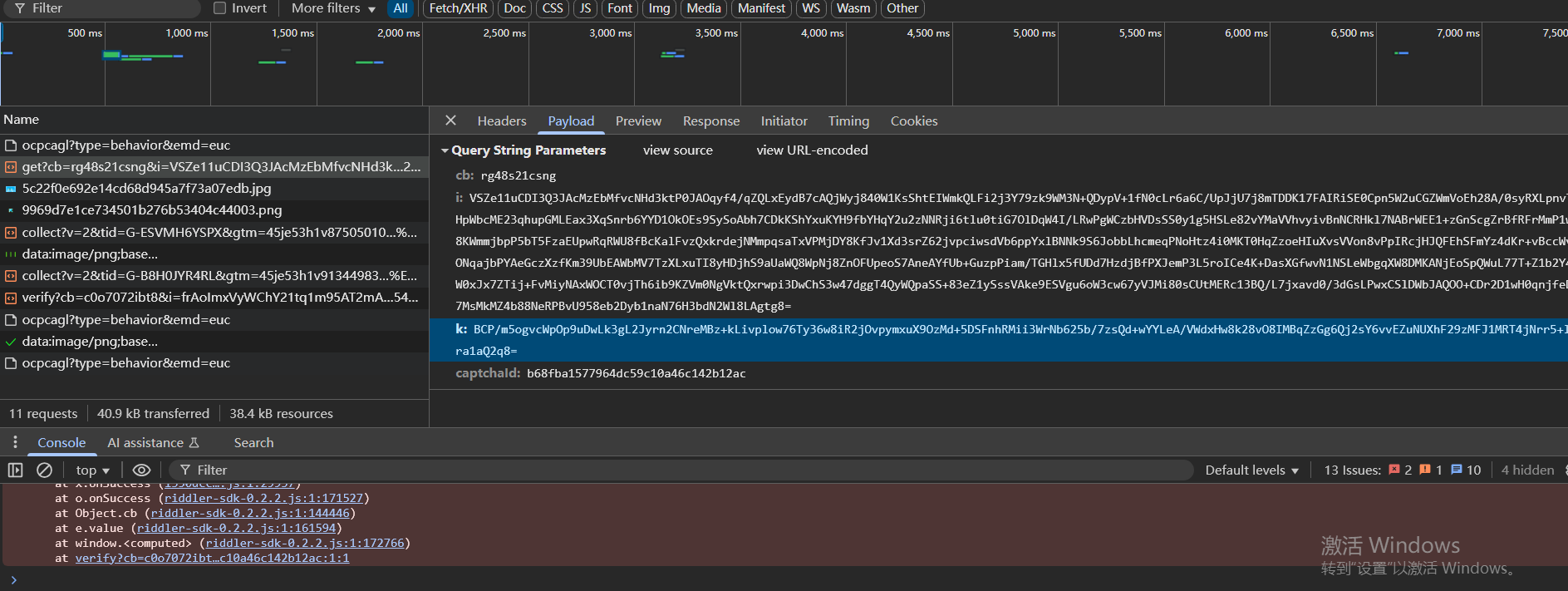
首先是请求图片的数据包

可以看到有cb参数、i参数、k参数、captchaId参数

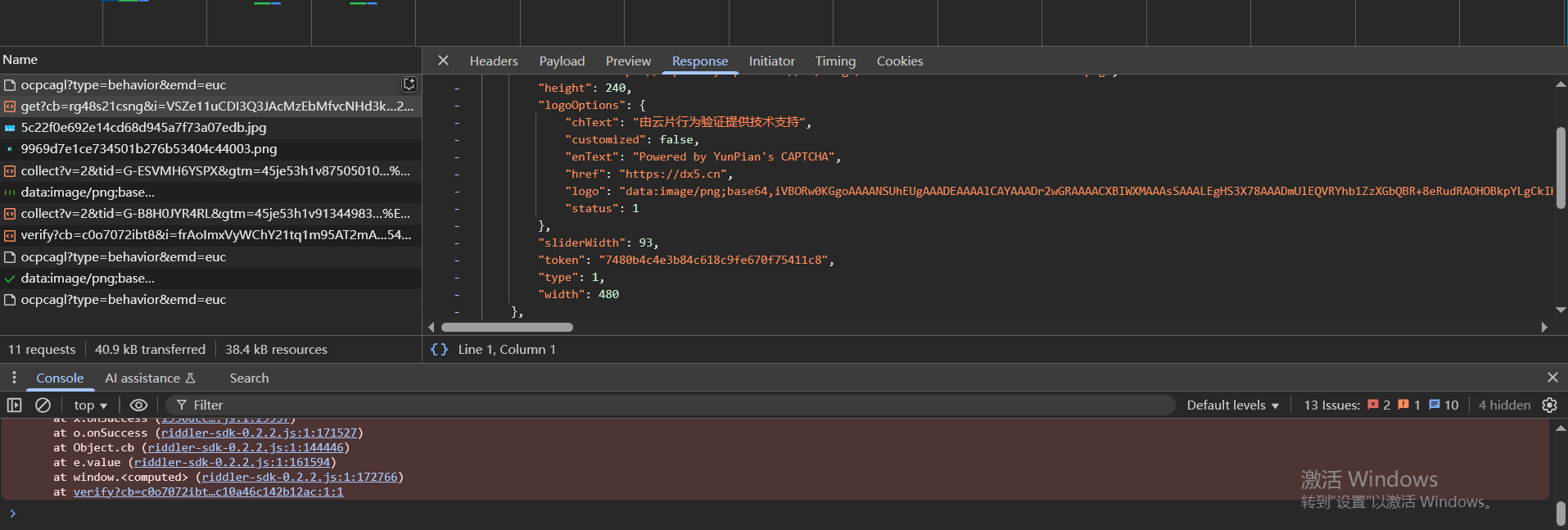
返回数据包如下,其中bg参数就是图片,还有一个token参数,是把下一步和当前步骤连接起来的

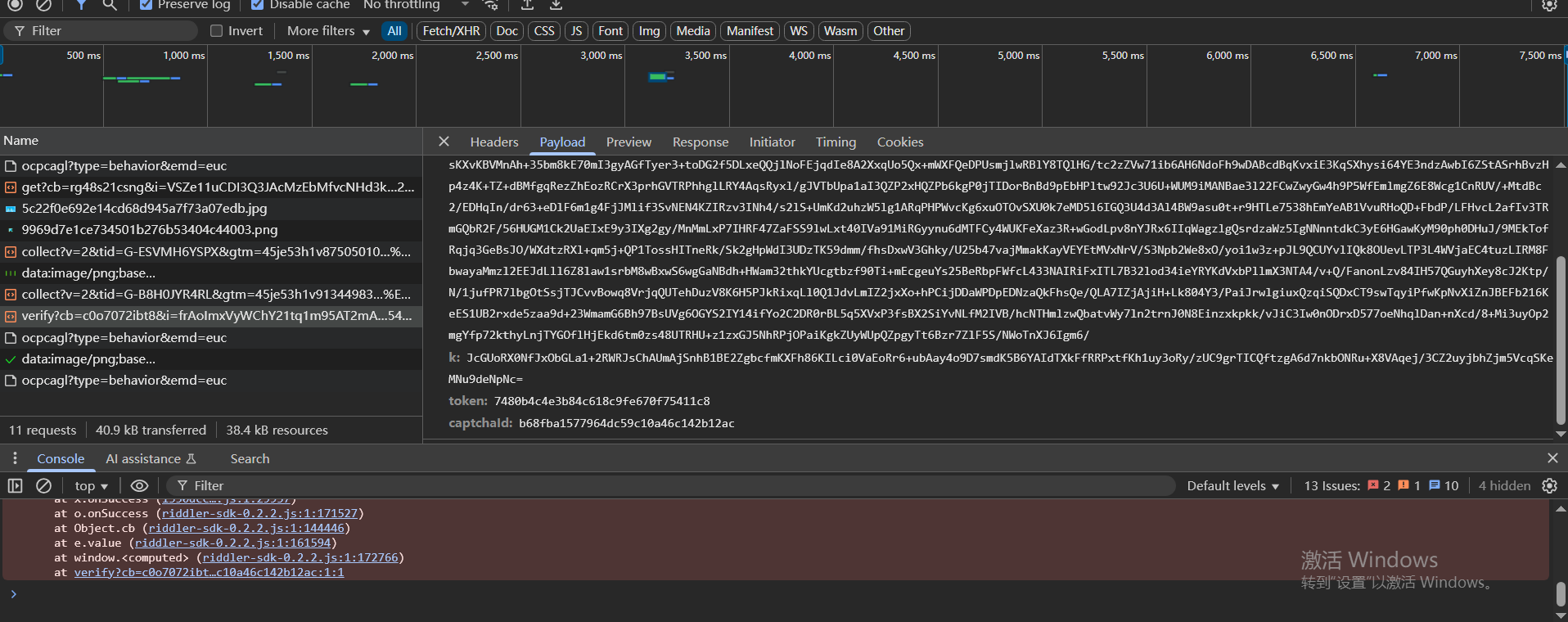
然后是验证的数据包,也有cb参数、i参数、k参数、captchaId参数、token参数,而且cb参数、i参数、k参数和请求图片的数据包不一样

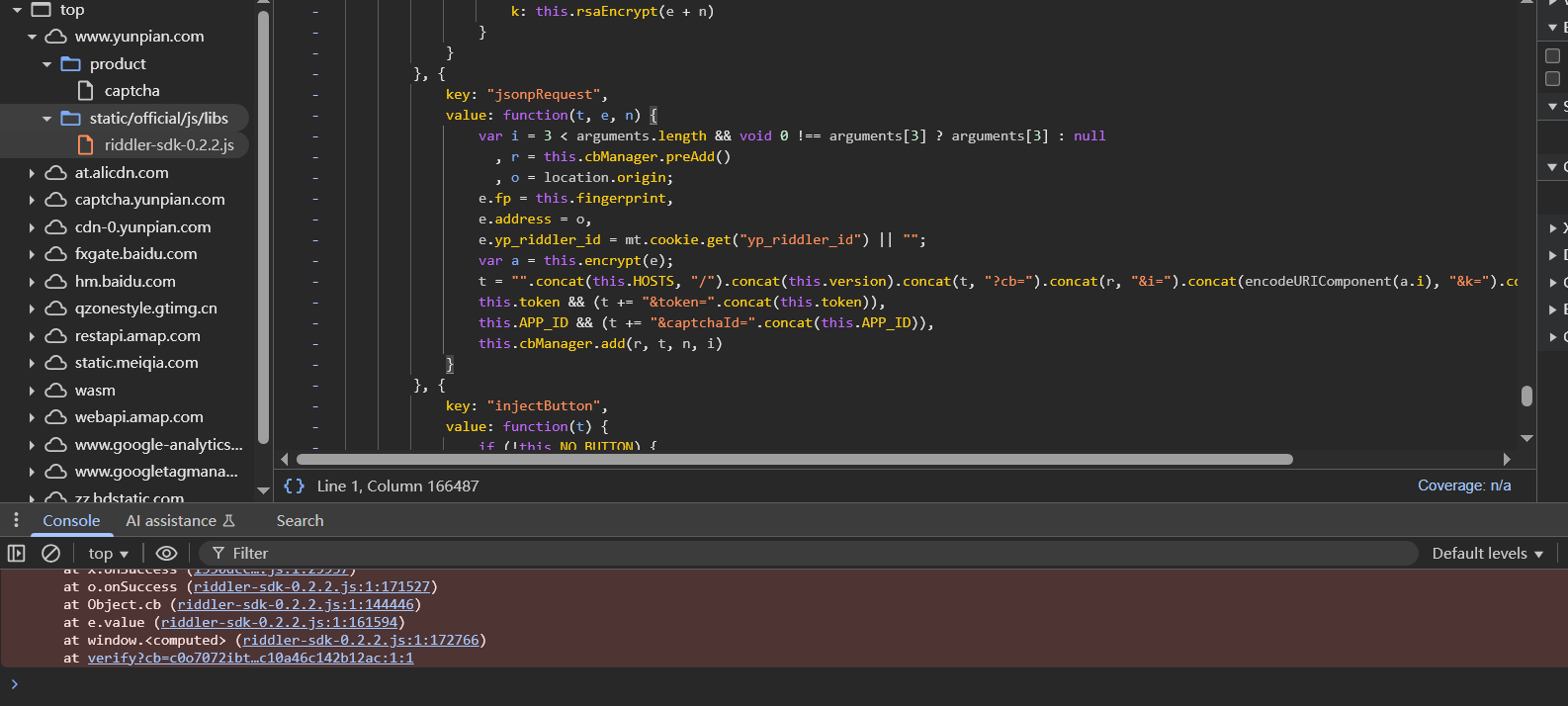
在请求图片的数据包处查看函数栈,找到如下函数

1
2
3
4
5
6
7
8
9
10
11
12
13
value: function(t, e, n) {
var i = 3 < arguments.length && void 0 !== arguments[3] ? arguments[3] : null
, r = this.cbManager.preAdd()
, o = location.origin;
e.fp = this.fingerprint,
e.address = o,
e.yp_riddler_id = mt.cookie.get("yp_riddler_id") || "";
var a = this.encrypt(e);
t = "".concat(this.HOSTS, "/").concat(this.version).concat(t, "?cb=").concat(r, "&i=").concat(encodeURIComponent(a.i), "&k=").concat(encodeURIComponent(a.k)),
this.token && (t += "&token=".concat(this.token)),
this.APP_ID && (t += "&captchaId=".concat(this.APP_ID)),
this.cbManager.add(r, t, n, i)
}

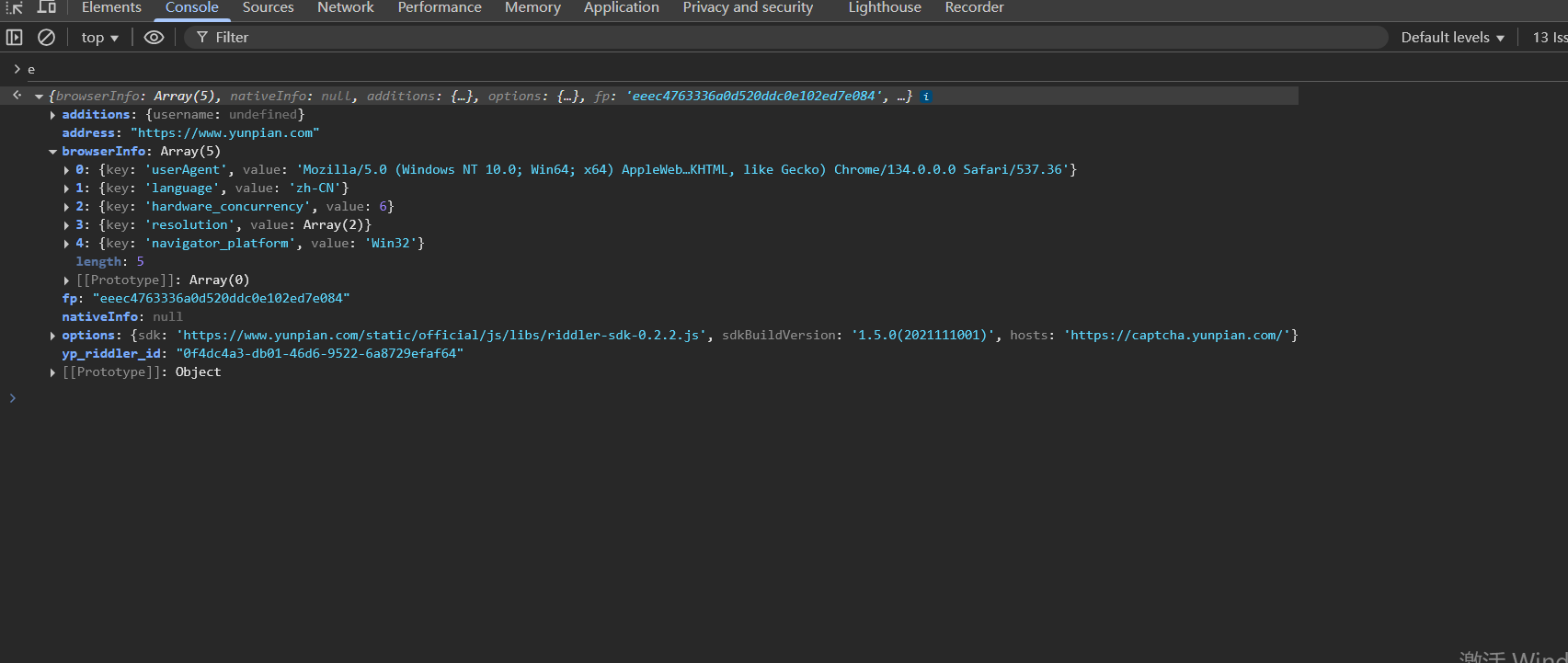
t是来自于a,a是e加密得到的,e的值可以打断点看一下

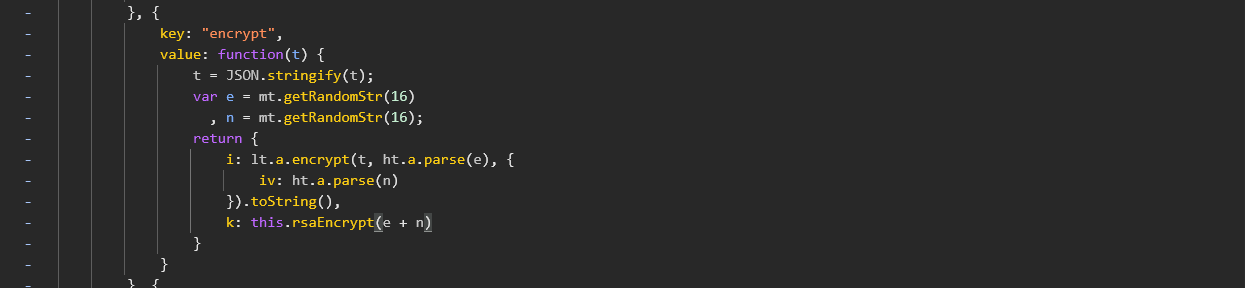
this.encrypt()函数如下

1
2
3
4
5
6
7
8
9
10
11
12
key: "encrypt",
value: function(t) {
t = JSON.stringify(t);
var e = mt.getRandomStr(16)
, n = mt.getRandomStr(16);
return {
i: lt.a.encrypt(t, ht.a.parse(e), {
iv: ht.a.parse(n)
}).toString(),
k: this.rsaEncrypt(e + n)
}
}

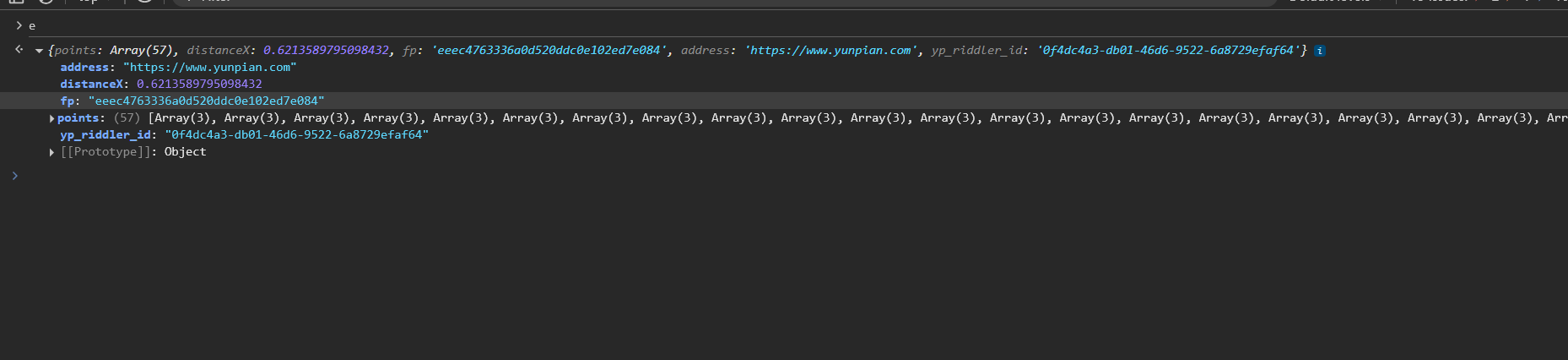
注意上面的e是在请求图片过程中的值,在滑动的时候的e的值是不一样的,有一个轨迹参数

设备指纹算法分析

也就是上面e参数中的fp

1
2
3
4
5
6
7
value: function(t, e, n) {
var i = 3 < arguments.length && void 0 !== arguments[3] ? arguments[3] : null
, r = this.cbManager.preAdd()
, o = location.origin;
e.fp = this.fingerprint,
e.address = o,
e.yp_riddler_id = mt.cookie.get("yp_riddler_id") || "";

设备指纹,就是风控用的,防止批量薅羊毛

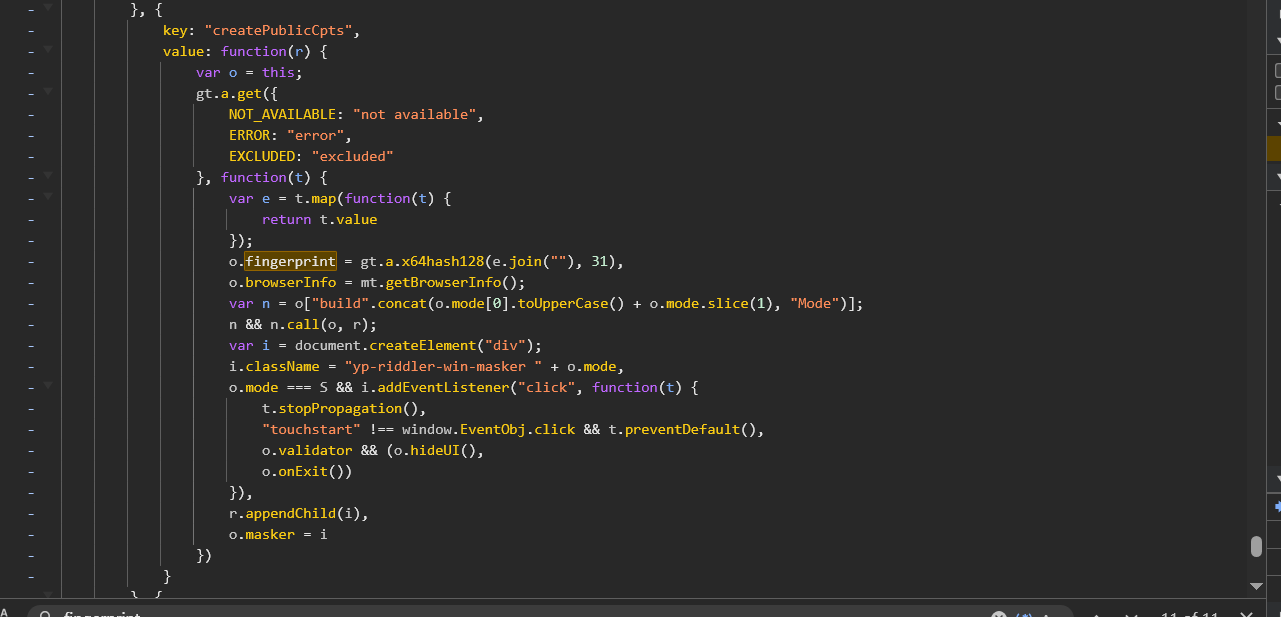
打上断点,this在浏览器js中指的就是全局,搜索一下fingerprint,找到如下代码

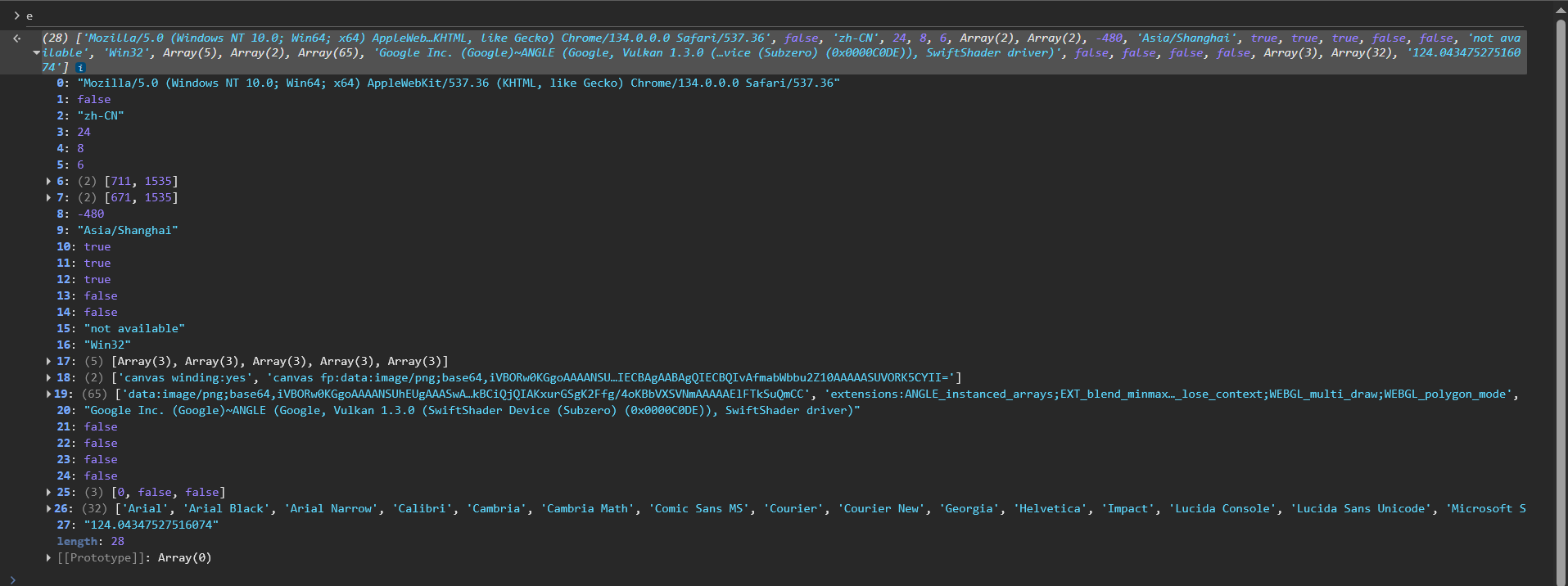
o.fingerprint = gt.a.x64hash128(e.join(""), 31)这一行打断点,然后刷新页面(不是刷新图片),查看e的值是什么

e是一个数组,28个元素,基本上都是设备的一些信息,e.join("")就是生成了个字符串

定位到加密代码直接扣下来就行了,这里e的有些数组元素可以随机化,比如版本号啥的

1
2
3
4
5
6
7
8
9
10
11
12
13
14
15
16
17
18
19
20
21
22
23
24
25
26
27
28
29
30
31
32
33
34
35
36
37
38
39
40
41
42
43
44
45
46
47
48
49
50
51
52
53
54
55
56
57
58
59
60
61
62
63
64
65
66
67
68
69
70
71
72
73
74
75
76
77
78
79
80
81
82
83
84
85
86
87
88
89
90
91
92
93
94
95
96
97
98
99
100
101
102
103
104
105
106
107
108
109
110
111
112
113
114
115
116
117
118
119
120
121
122
123
124
125
126
127
128
129
130
131
132
133
134
135
136
137
138
139
140
141
142
let h = function (t, e) {
t = [t[0] >>> 16, 65535 & t[0], t[1] >>> 16, 65535 & t[1]],
e = [e[0] >>> 16, 65535 & e[0], e[1] >>> 16, 65535 & e[1]];
var n = [0, 0, 0, 0];
return n[3] += t[3] + e[3],
n[2] += n[3] >>> 16,
n[3] &= 65535,
n[2] += t[2] + e[2],
n[1] += n[2] >>> 16,
n[2] &= 65535,
n[1] += t[1] + e[1],
n[0] += n[1] >>> 16,
n[1] &= 65535,
n[0] += t[0] + e[0],
n[0] &= 65535,
[n[0] << 16 | n[1], n[2] << 16 | n[3]]
}
, d = function (t, e) {
t = [t[0] >>> 16, 65535 & t[0], t[1] >>> 16, 65535 & t[1]],
e = [e[0] >>> 16, 65535 & e[0], e[1] >>> 16, 65535 & e[1]];
var n = [0, 0, 0, 0];
return n[3] += t[3] * e[3],
n[2] += n[3] >>> 16,
n[3] &= 65535,
n[2] += t[2] * e[3],
n[1] += n[2] >>> 16,
n[2] &= 65535,
n[2] += t[3] * e[2],
n[1] += n[2] >>> 16,
n[2] &= 65535,
n[1] += t[1] * e[3],
n[0] += n[1] >>> 16,
n[1] &= 65535,
n[1] += t[2] * e[2],
n[0] += n[1] >>> 16,
n[1] &= 65535,
n[1] += t[3] * e[1],
n[0] += n[1] >>> 16,
n[1] &= 65535,
n[0] += t[0] * e[3] + t[1] * e[2] + t[2] * e[1] + t[3] * e[0],
n[0] &= 65535,
[n[0] << 16 | n[1], n[2] << 16 | n[3]]
}
, f = function (t, e) {
return 32 === (e %= 64) ? [t[1], t[0]] : e < 32 ? [t[0] << e | t[1] >>> 32 - e, t[1] << e | t[0] >>> 32 - e] : (e -= 32,
[t[1] << e | t[0] >>> 32 - e, t[0] << e | t[1] >>> 32 - e])
}
, p = function (t, e) {
return 0 === (e %= 64) ? t : e < 32 ? [t[0] << e | t[1] >>> 32 - e, t[1] << e] : [t[1] << e - 32, 0]
}
, g = function (t, e) {
return [t[0] ^ e[0], t[1] ^ e[1]]
}
, m = function (t) {
return t = g(t, [0, t[0] >>> 1]),
t = d(t, [4283543511, 3981806797]),
t = g(t, [0, t[0] >>> 1]),
t = d(t, [3301882366, 444984403]),
t = g(t, [0, t[0] >>> 1])
}
let fp=[
...
];
fp=fp.join("");
s = function (t, e) {
e = e || 0;
for (var n = (t = t || "").length % 16, i = t.length - n, r = [0, e], o = [0, e], a = [0, 0], s = [0, 0], c = [2277735313, 289559509], l = [1291169091, 658871167], u = 0; u < i; u += 16)
a = [255 & t.charCodeAt(u + 4) | (255 & t.charCodeAt(u + 5)) << 8 | (255 & t.charCodeAt(u + 6)) << 16 | (255 & t.charCodeAt(u + 7)) << 24, 255 & t.charCodeAt(u) | (255 & t.charCodeAt(u + 1)) << 8 | (255 & t.charCodeAt(u + 2)) << 16 | (255 & t.charCodeAt(u + 3)) << 24],
s = [255 & t.charCodeAt(u + 12) | (255 & t.charCodeAt(u + 13)) << 8 | (255 & t.charCodeAt(u + 14)) << 16 | (255 & t.charCodeAt(u + 15)) << 24, 255 & t.charCodeAt(u + 8) | (255 & t.charCodeAt(u + 9)) << 8 | (255 & t.charCodeAt(u + 10)) << 16 | (255 & t.charCodeAt(u + 11)) << 24],
a = d(a, c),
a = f(a, 31),
a = d(a, l),
r = g(r, a),
r = f(r, 27),
r = h(r, o),
r = h(d(r, [0, 5]), [0, 1390208809]),
s = d(s, l),
s = f(s, 33),
s = d(s, c),
o = g(o, s),
o = f(o, 31),
o = h(o, r),
o = h(d(o, [0, 5]), [0, 944331445]);
switch (a = [0, 0],
s = [0, 0],
n) {
case 15:
s = g(s, p([0, t.charCodeAt(u + 14)], 48));
case 14:
s = g(s, p([0, t.charCodeAt(u + 13)], 40));
case 13:
s = g(s, p([0, t.charCodeAt(u + 12)], 32));
case 12:
s = g(s, p([0, t.charCodeAt(u + 11)], 24));
case 11:
s = g(s, p([0, t.charCodeAt(u + 10)], 16));
case 10:
s = g(s, p([0, t.charCodeAt(u + 9)], 8));
case 9:
s = g(s, [0, t.charCodeAt(u + 8)]),
s = d(s, l),
s = f(s, 33),
s = d(s, c),
o = g(o, s);
case 8:
a = g(a, p([0, t.charCodeAt(u + 7)], 56));
case 7:
a = g(a, p([0, t.charCodeAt(u + 6)], 48));
case 6:
a = g(a, p([0, t.charCodeAt(u + 5)], 40));
case 5:
a = g(a, p([0, t.charCodeAt(u + 4)], 32));
case 4:
a = g(a, p([0, t.charCodeAt(u + 3)], 24));
case 3:
a = g(a, p([0, t.charCodeAt(u + 2)], 16));
case 2:
a = g(a, p([0, t.charCodeAt(u + 1)], 8));
case 1:
a = g(a, [0, t.charCodeAt(u)]),
a = d(a, c),
a = f(a, 31),
a = d(a, l),
r = g(r, a)
}
return r = g(r, [0, t.length]),
o = g(o, [0, t.length]),
r = h(r, o),
o = h(o, r),
r = m(r),
o = m(o),
r = h(r, o),
o = h(o, r),
("00000000" + (r[0] >>> 0).toString(16)).slice(-8) + ("00000000" + (r[1] >>> 0).toString(16)).slice(-8) + ("00000000" + (o[0] >>> 0).toString(16)).slice(-8) + ("00000000" + (o[1] >>> 0).toString(16)).slice(-8)
}

function get_fp() {
let result =s(fp,31);
console.log(result);
return result;
};
get_fp();

YP滑块加密算法还原

就是解决请求图片数据包中的cbik参数

1
2
3
4
5
6
7
8
9
10
11
12
13
14
key: "jsonpRequest",
value: function(t, e, n) {
var i = 3 < arguments.length && void 0 !== arguments[3] ? arguments[3] : null
, r = this.cbManager.preAdd()
, o = location.origin;
e.fp = this.fingerprint,
e.address = o,
e.yp_riddler_id = mt.cookie.get("yp_riddler_id") || "";
var a = this.encrypt(e);
t = "".concat(this.HOSTS, "/").concat(this.version).concat(t, "?cb=").concat(r, "&i=").concat(encodeURIComponent(a.i), "&k=").concat(encodeURIComponent(a.k)),
this.token && (t += "&token=".concat(this.token)),
this.APP_ID && (t += "&captchaId=".concat(this.APP_ID)),
this.cbManager.add(r, t, n, i)
}

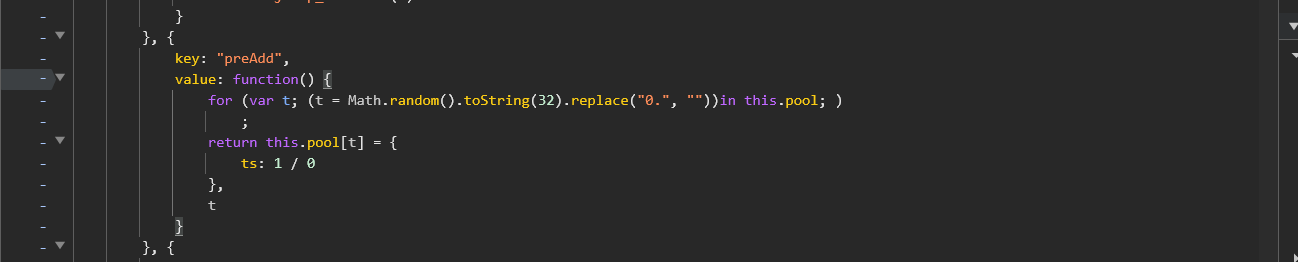
cb参数来自于rrthis.cbManager.preAdd()生成的

1
2
3
4
5
6
7
8
value: function() {
for (var t; (t = Math.random().toString(32).replace("0.", ""))in this.pool; )
;
return this.pool[t] = {
ts: 1 / 0
},
t
}

这里在扣代码的时候,可以断点调试一下,this.pool其实就是空的

1
2
3
4
5
6
7
8
let pool={}
function get_cb() {
for (var t; (t = Math.random().toString(32).replace("0.", "")) in pool;)
;
return pool[t] = {ts: 1 / 0}, t
}
let a = get_cb()
console.log(a)

e.address是固定值'https://www.yunpian.com'

e.yp_riddler_id来自于e.yp_riddler_id = mt.cookie.get("yp_riddler_id") || ""; ,这里不是去找get方法的def,这样找是找不到的,要去找setcookie的地方,也就是全局搜索yp_riddler_id字符串

1
2
3
4
5
key: "setCookie",
value: function() {
var t = mt.createUUid();
mt.cookie.set("yp_riddler_id", t, 356)
}

createUUid方法如下

1
2
3
4
5
6
7
8
9
mt.createUUid = function() {
var n = (new Date).getTime();
return window.performance && "function" == typeof window.performance.now && (n += window.performance.now()),
"xxxxxxxx-xxxx-4xxx-yxxx-xxxxxxxxxxxx".replace(/[xy]/g, function(t) {
var e = (n + 16 * Math.random()) % 16 | 0;
return n = Math.floor(n / 16),
("x" === t ? e : 3 & e | 8).toString(16)
})
}

扣代码,这里涉及到补环境,也就是windowwindow.performance,在node环境中是没有的,需要全局定义一下,window在node中就是window=global,至于window.performance怎么补,可以运行到该代码的时候,console里输出一下window.performance,然后运行copy(window.performance),这样window.performance就被复制到剪切板中了

1
2
3
4
5
6
7
8
9
10
11
12
13
14
15
16
17
18
19
20
21
22
23
24
25
26
27
28
29
30
31
32
33
34
35
36
37
38
39
40
41
42
window=global
window.performance={
"timeOrigin": 1742369562490.1,
"timing": {
"connectStart": 1742369562494,
"secureConnectionStart": 0,
"unloadEventEnd": 1742369562624,
"domainLookupStart": 1742369562494,
"domainLookupEnd": 1742369562494,
"responseStart": 1742369562607,
"connectEnd": 1742369562494,
"responseEnd": 1742369562608,
"requestStart": 1742369562496,
"domLoading": 1742369562632,
"redirectStart": 0,
"loadEventEnd": 1742371077075,
"domComplete": 1742371077074,
"navigationStart": 1742369562490,
"loadEventStart": 1742371077074,
"domContentLoadedEventEnd": 1742369562999,
"unloadEventStart": 1742369562624,
"redirectEnd": 0,
"domInteractive": 1742369562903,
"fetchStart": 1742369562494,
"domContentLoadedEventStart": 1742369562994
},
"navigation": {
"type": 1,
"redirectCount": 0
}
}
function createUUid() {
var n = (new Date).getTime();
return window.performance && "function" == typeof window.performance.now && (n += window.performance.now()),
"xxxxxxxx-xxxx-4xxx-yxxx-xxxxxxxxxxxx".replace(/[xy]/g, function (t) {
var e = (n + 16 * Math.random()) % 16 | 0;
return n = Math.floor(n / 16),
("x" === t ? e : 3 & e | 8).toString(16)
})
}
let a = createUUid()
console.log(a)

后面的参数其实方法是一样的,无非是加上了一些库

1
2
3
4
5
6
7
8
9
10
11
12
13
14
15
16
17
18
19
20
21
22
23
24
25
26
27
28
29
30
31
32
33
34
35
36
37
38
39
40
41
42
43
44
45
46
47
48
49
50
51
52
53
54
55
56
57
58
59
60
61
62
63
64
65
66
67
68
69
70
71
72
73
74
75
76
77
78
79
80
81
82
83
84
85
86
87
88
89
90
91
92
93
94
95
96
97
98
99
100
101
102
103
104
105
106
107
108
109
110
111
112
113
114
115
116
117
118
119
120
121
122
123
124
125
126
127
128
129
130
131
132
133
134
135
136
137
138
139
140
141
142
143
144
145
146
147
148
149
150
151
152
153
154
155
156
157
158
159
160
161
162
163
164
165
166
167
168
169
170
171
172
173
174
175
176
177
178
179
180
181
182
183
184
185
186
187
188
189
190
191
192
193
194
195
196
197
198
199
200
201
202
203
204
205
206
207
208
209
210
211
212
213
214
215
216
217
218
219
220
221
222
223
224
225
226
227
228
229
230
231
232
233
234
235
236
237
238
239
240
241
242
243
244
245
246
247
248
249
250
251
252
253
254
255
256
257
258
259
260
window=global;
const JSEncrypt = require("C:\\Users\\Administrator\\AppData\\Roaming\\npm\\node_modules\\jsencrypt");
const CryptoJS =require("C:\\Users\\Administrator\\AppData\\Roaming\\npm\\node_modules\\crypto-js");
pool={};
window.performance={
"timeOrigin": 1681825542219,
"timing": {
"connectStart": 1681825542220,
"navigationStart": 1681825542219,
"secureConnectionStart": 0,
"fetchStart": 1681825542220,
"domContentLoadedEventStart": 1681825543481,
"responseStart": 1681825542301,
"domInteractive": 1681825543401,
"domainLookupEnd": 1681825542220,
"responseEnd": 1681825542422,
"redirectStart": 0,
"requestStart": 1681825542224,
"unloadEventEnd": 1681825542309,
"unloadEventStart": 1681825542309,
"domLoading": 1681825542312,
"domComplete": 1681825551739,
"domainLookupStart": 1681825542220,
"loadEventStart": 1681825551739,
"domContentLoadedEventEnd": 1681825543484,
"loadEventEnd": 1681825551740,
"redirectEnd": 0,
"connectEnd": 1681825542220
},
"navigation": {
"type": 1,
"redirectCount": 0
}
};
function get_cb() {
for (var t; (t = Math.random().toString(32).replace("0.", ""))in pool; )
;
console.log(t);
return t;
};

var h = function(t, e) {
t = [t[0] >>> 16, 65535 & t[0], t[1] >>> 16, 65535 & t[1]],
e = [e[0] >>> 16, 65535 & e[0], e[1] >>> 16, 65535 & e[1]];
var n = [0, 0, 0, 0];
return n[3] += t[3] + e[3],
n[2] += n[3] >>> 16,
n[3] &= 65535,
n[2] += t[2] + e[2],
n[1] += n[2] >>> 16,
n[2] &= 65535,
n[1] += t[1] + e[1],
n[0] += n[1] >>> 16,
n[1] &= 65535,
n[0] += t[0] + e[0],
n[0] &= 65535,
[n[0] << 16 | n[1], n[2] << 16 | n[3]]
}
, d = function(t, e) {
t = [t[0] >>> 16, 65535 & t[0], t[1] >>> 16, 65535 & t[1]],
e = [e[0] >>> 16, 65535 & e[0], e[1] >>> 16, 65535 & e[1]];
var n = [0, 0, 0, 0];
return n[3] += t[3] * e[3],
n[2] += n[3] >>> 16,
n[3] &= 65535,
n[2] += t[2] * e[3],
n[1] += n[2] >>> 16,
n[2] &= 65535,
n[2] += t[3] * e[2],
n[1] += n[2] >>> 16,
n[2] &= 65535,
n[1] += t[1] * e[3],
n[0] += n[1] >>> 16,
n[1] &= 65535,
n[1] += t[2] * e[2],
n[0] += n[1] >>> 16,
n[1] &= 65535,
n[1] += t[3] * e[1],
n[0] += n[1] >>> 16,
n[1] &= 65535,
n[0] += t[0] * e[3] + t[1] * e[2] + t[2] * e[1] + t[3] * e[0],
n[0] &= 65535,
[n[0] << 16 | n[1], n[2] << 16 | n[3]]
}
, f = function(t, e) {
return 32 === (e %= 64) ? [t[1], t[0]] : e < 32 ? [t[0] << e | t[1] >>> 32 - e, t[1] << e | t[0] >>> 32 - e] : (e -= 32,
[t[1] << e | t[0] >>> 32 - e, t[0] << e | t[1] >>> 32 - e])
}
, p = function(t, e) {
return 0 === (e %= 64) ? t : e < 32 ? [t[0] << e | t[1] >>> 32 - e, t[1] << e] : [t[1] << e - 32, 0]
}
, g = function(t, e) {
return [t[0] ^ e[0], t[1] ^ e[1]]
}
, m = function(t) {
return t = g(t, [0, t[0] >>> 1]),
t = d(t, [4283543511, 3981806797]),
t = g(t, [0, t[0] >>> 1]),
t = d(t, [3301882366, 444984403]),
t = g(t, [0, t[0] >>> 1])
};


let fp=[
];
fp=fp.join("");
s = function(t, e) {
e = e || 0;
for (var n = (t = t || "").length % 16, i = t.length - n, r = [0, e], o = [0, e], a = [0, 0], s = [0, 0], c = [2277735313, 289559509], l = [1291169091, 658871167], u = 0; u < i; u += 16)
a = [255 & t.charCodeAt(u + 4) | (255 & t.charCodeAt(u + 5)) << 8 | (255 & t.charCodeAt(u + 6)) << 16 | (255 & t.charCodeAt(u + 7)) << 24, 255 & t.charCodeAt(u) | (255 & t.charCodeAt(u + 1)) << 8 | (255 & t.charCodeAt(u + 2)) << 16 | (255 & t.charCodeAt(u + 3)) << 24],
s = [255 & t.charCodeAt(u + 12) | (255 & t.charCodeAt(u + 13)) << 8 | (255 & t.charCodeAt(u + 14)) << 16 | (255 & t.charCodeAt(u + 15)) << 24, 255 & t.charCodeAt(u + 8) | (255 & t.charCodeAt(u + 9)) << 8 | (255 & t.charCodeAt(u + 10)) << 16 | (255 & t.charCodeAt(u + 11)) << 24],
a = d(a, c),
a = f(a, 31),
a = d(a, l),
r = g(r, a),
r = f(r, 27),
r = h(r, o),
r = h(d(r, [0, 5]), [0, 1390208809]),
s = d(s, l),
s = f(s, 33),
s = d(s, c),
o = g(o, s),
o = f(o, 31),
o = h(o, r),
o = h(d(o, [0, 5]), [0, 944331445]);
switch (a = [0, 0],
s = [0, 0],
n) {
case 15:
s = g(s, p([0, t.charCodeAt(u + 14)], 48));
case 14:
s = g(s, p([0, t.charCodeAt(u + 13)], 40));
case 13:
s = g(s, p([0, t.charCodeAt(u + 12)], 32));
case 12:
s = g(s, p([0, t.charCodeAt(u + 11)], 24));
case 11:
s = g(s, p([0, t.charCodeAt(u + 10)], 16));
case 10:
s = g(s, p([0, t.charCodeAt(u + 9)], 8));
case 9:
s = g(s, [0, t.charCodeAt(u + 8)]),
s = d(s, l),
s = f(s, 33),
s = d(s, c),
o = g(o, s);
case 8:
a = g(a, p([0, t.charCodeAt(u + 7)], 56));
case 7:
a = g(a, p([0, t.charCodeAt(u + 6)], 48));
case 6:
a = g(a, p([0, t.charCodeAt(u + 5)], 40));
case 5:
a = g(a, p([0, t.charCodeAt(u + 4)], 32));
case 4:
a = g(a, p([0, t.charCodeAt(u + 3)], 24));
case 3:
a = g(a, p([0, t.charCodeAt(u + 2)], 16));
case 2:
a = g(a, p([0, t.charCodeAt(u + 1)], 8));
case 1:
a = g(a, [0, t.charCodeAt(u)]),
a = d(a, c),
a = f(a, 31),
a = d(a, l),
r = g(r, a)
}
return r = g(r, [0, t.length]),
o = g(o, [0, t.length]),
r = h(r, o),
o = h(o, r),
r = m(r),
o = m(o),
r = h(r, o),
o = h(o, r),
("00000000" + (r[0] >>> 0).toString(16)).slice(-8) + ("00000000" + (r[1] >>> 0).toString(16)).slice(-8) + ("00000000" + (o[0] >>> 0).toString(16)).slice(-8) + ("00000000" + (o[1] >>> 0).toString(16)).slice(-8)
};

function get_fp() {
let result =s(fp,31);
console.log(result);
return result;
};

address='https://www.yunpian.com';

function createUUid() {
var n = (new Date).getTime();
return window.performance && "function" == typeof window.performance.now && (n += window.performance.now()),
"xxxxxxxx-xxxx-4xxx-yxxx-xxxxxxxxxxxx".replace(/[xy]/g, function(t) {
var e = (n + 16 * Math.random()) % 16 | 0;
return n = Math.floor(n / 16),
("x" === t ? e : 3 & e | 8).toString(16)
})
}
yp_riddler_id=createUUid();

encryptE={
"browserInfo": [
{
"key": "userAgent",
"value": "Mozilla/5.0 (Windows NT 10.0; Win64; x64) AppleWebKit/537.36 (KHTML, like Gecko) Chrome/112.0.0.0 Safari/537.36 Edg/112.0.1722.48"
},
{
"key": "language",
"value": "zh-CN"
},
{
"key": "hardware_concurrency",
"value": 16
},
{
"key": "resolution",
"value": [
1707,
960
]
},
{
"key": "navigator_platform",
"value": "Win32"
}
],
"nativeInfo": null,
"additions": {},
"options": {
"sdk": "https://www.yunpian.com/static/official/js/libs/riddler-sdk-0.2.2.js",
"sdkBuildVersion": "1.5.0(2021111001)",
"hosts": "https://captcha.yunpian.com/"
},
"fp": get_fp(),
"address": address,
"yp_riddler_id": yp_riddler_id
};
encryptE=JSON.stringify(encryptE);
console.log(encryptE);

function getRandomStr(t) {
for (var e = ""; e.length < t; )
e += Math.random().toString(36).substr(2);
return e = e.slice(0, t)
};

function get_data(encryptE) {
var e = getRandomStr(16), n = getRandomStr(16);

var rsa=new JSEncrypt();
rsa.setPublicKey='-----BEGIN PUBLIC KEY-----MIGfMA0GCSqGSIb3DQEBAQUAA4GNADCBiQKBgQDnOWe/gs033L/2/xR3oi6SLAMPBY5VledUqqH6dbCNOdrGX4xW+1x6NUfvmwpHRBA2C7xWDDvOIldTl0rMtERTDy9homrVqEcW6/TY+dSVFL3e2Yg2sVaehHv7FhmATkgfC2FcXt8Wvm99QpKRSrGKpcFYJwOj2F8hJh+rTG0IPQIDAQAB-----END PUBLIC KEY-----';


let result={
cb:get_cb(),
i:CryptoJS.AES.encrypt(encryptE, CryptoJS.enc.Utf8.parse(e), {
iv: CryptoJS.enc.Utf8.parse(n)
}).toString(),
k:rsa.encrypt(e+n)
}
console.log(result)
}
get_data(encryptE);

python代码调用js

前面HK滑块的py_mini_racer的库,是v8环境的,而上面的js代码,是node环境的,所以不能用py_mini_racer进行调用js,可以用命令行的方式去调用js,这样的话就需要把js里面的无用的conso.log给注释掉,只输出最终结果

1
2
3
4
5
6
7
8
9
10
11
12
13
14
15
16
17
18
19
20
21
22
23
24
25
26
27
28
29
30
31
32
33
import httpx
import json
import os

import requests

with os.popen('node yp.js') as node:
result=node.read()
result=json.loads(result)
print(result)

client=httpx.Client(http2=True)
url='https://captcha.yunpian.com//v1/jsonp/captcha/get'
params={
'cb':result['cb'],
'i':result['i'],
'k':result['k'],
'captchaId': 'b68fba1577964dc59c10a46c142b12ac'
}
headers={
'cookie': '_ga=GA1.1.1387398659.1681738741; MEIQIA_TRACK_ID=2OEApGNpuYOpSTrWNaNhUXcySSq; MEIQIA_VISIT_ID=2OYVIIbA1Vrh2itlxLqZr1NrbJB; Hm_lvt_70eec7aeabdef9224878ecbafcc9bf6a=1681115549,1681213932,1681737419,1681825437; __wksid=n-C99438AF9EC74F24AB3F085FC59135F9; Hm_lpvt_70eec7aeabdef9224878ecbafcc9bf6a=1681908818; _ga_ESVMH6YSPX=GS1.1.1681908817.4.1.1681908822.0.0.0',
'referer': 'https://www.yunpian.com/',
'user-agent': 'Mozilla/5.0 (Windows NT 10.0; Win64; x64) AppleWebKit/537.36 (KHTML, like Gecko) Chrome/112.0.0.0 Safari/537.36 Edg/112.0.1722.48'
}
html=client.get(url,params=params,headers=headers)


result=json.loads(html.text.replace('ypjsonp(','').replace(')',''))
print(result['data']['bg'])
print(result['data']['token'])

with open('yp.png','wb') as f:
f.write(requests.get(result['data']['bg']).content)

轨迹伪造

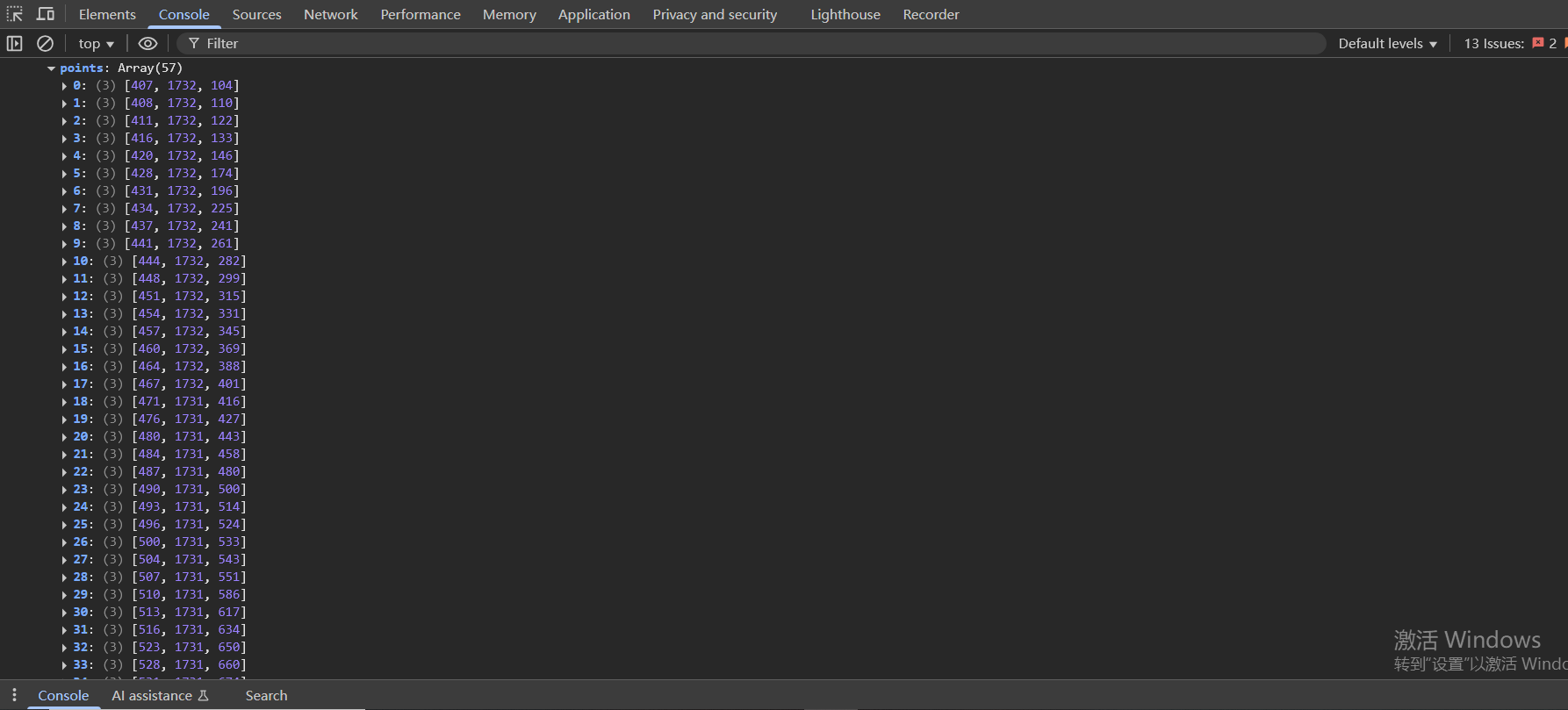
简单跑几次会发现,轨迹里,最后的是时间戳,而且是从0开始计时的,数值不会特别大,x的值逐渐递增,y的值不变

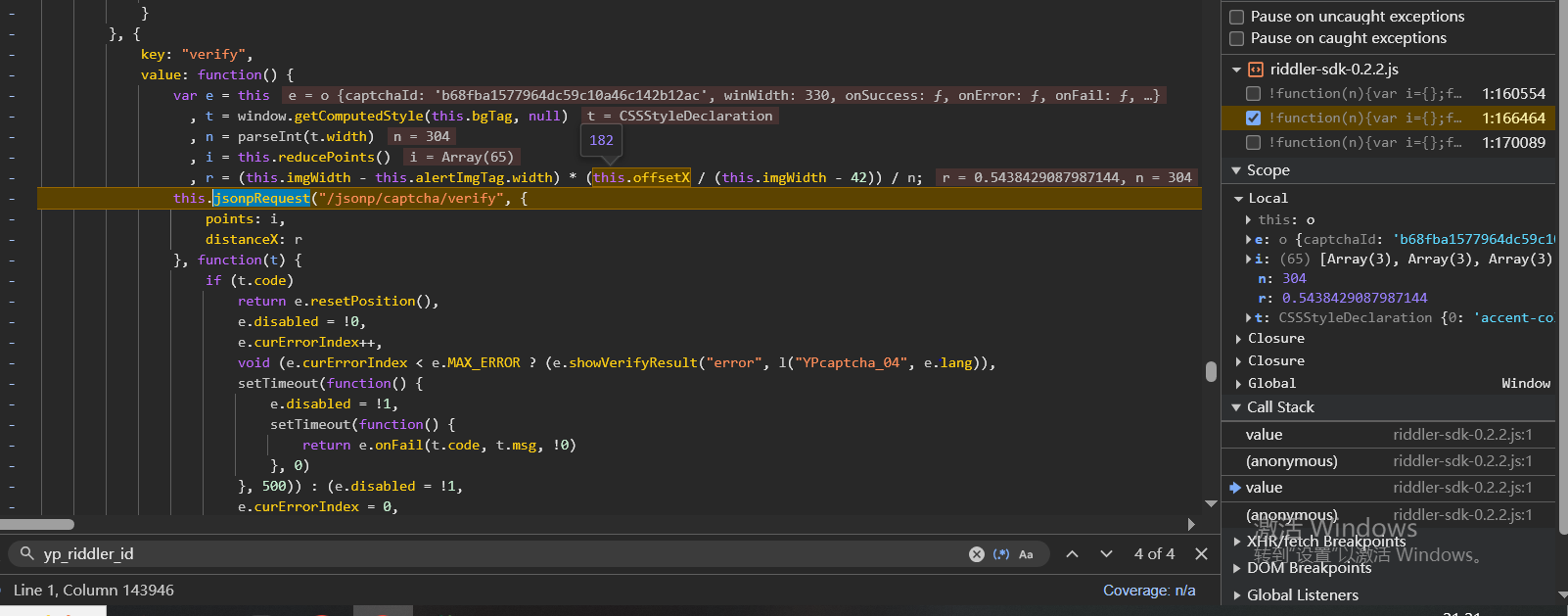
distanceX的值,稍微跟一下堆栈就发现了

r的值来自于r = (this.imgWidth - this.alertImgTag.width) * (this.offsetX / (this.imgWidth - 42)) / n,而this.imgWidth - this.alertImgTag.width会发现是个固定值

1
2
3
4
5
6
7
8
9
10
11
12
13
14
15
16
17
18
19
import random

points=[]

x=280
offsetX=31
x_end=x+offsetX
mtime=3

while x<=x_end:
points.append([x,1270, mtime])
x+=random.choice([1,2,3])
mtime+=random.choice([3,4,5])

points.append([x,1270, mtime])
print("points",points)

distanceX=245 * (offsetX / (304 - 42)) / 304
print(distanceX)

python数组怎么传参给js代码?因为encrypt的代码是js的,用命令行传参的方式去传参,注意node的命令行参数默认是string类型

1
2
3
4
5
6
7
encryptE={
"points": JSON.parse(process.argv[2]),
"distanceX": parseFloat(process.argv[3]),
"fp": get_fp(),
"address": 'https://www.yunpian.com',
"yp_riddler_id": createUUid()
};

调用的时候第二个参数的py数组要是””指定为string类型

1
node enc.js "[[1,2,3],...]" 3.13

滑块轨迹发包

1
2
3
4
5
6
7
8
9
10
11
12
13
14
15
16
17
18
19
20
21
22
23
24
25
26
27
28
29
30
31
32
33
34
35
36
37
38
39
40
41
42
43
44
45
46
47
48
49
50
51
52
53
54
55
56
57
58
59
60
61
62
63
64
65
66
67
68
69
70
71
72
73
74
75
76
77
78
79
80
81
import httpx
import json
import os

import requests

with os.popen('node yp.js') as node:
result=node.read()
result=json.loads(result)
print(result)

client=httpx.Client(http2=True)
url='https://captcha.yunpian.com//v1/jsonp/captcha/get'
params={
'cb':result['cb'],
'i':result['i'],
'k':result['k'],
'captchaId': 'b68fba1577964dc59c10a46c142b12ac'
}
headers={
'cookie': '_ga=GA1.1.1387398659.1681738741; MEIQIA_TRACK_ID=2OEApGNpuYOpSTrWNaNhUXcySSq; MEIQIA_VISIT_ID=2OYVIIbA1Vrh2itlxLqZr1NrbJB; Hm_lvt_70eec7aeabdef9224878ecbafcc9bf6a=1681115549,1681213932,1681737419,1681825437; __wksid=n-C99438AF9EC74F24AB3F085FC59135F9; Hm_lpvt_70eec7aeabdef9224878ecbafcc9bf6a=1681908818; _ga_ESVMH6YSPX=GS1.1.1681908817.4.1.1681908822.0.0.0',
'referer': 'https://www.yunpian.com/',
'user-agent': 'Mozilla/5.0 (Windows NT 10.0; Win64; x64) AppleWebKit/537.36 (KHTML, like Gecko) Chrome/112.0.0.0 Safari/537.36 Edg/112.0.1722.48'
}
html=client.get(url,params=params,headers=headers)


result=json.loads(html.text.replace('ypjsonp(','').replace(')',''))
token=result['data']['token']
print(result['data']['bg'])
print('token:',token)

with open('yp.png','wb') as f:
f.write(requests.get(result['data']['bg']).content)


import random

points=[]

x=280
offsetX=31
x_end=x+offsetX
mtime=3

while x<=x_end:
points.append([x,1270, mtime])
x+=random.choice([1,2,3])
mtime+=random.choice([3,4,5])

points.append([x,1270, mtime])
print(points)

distanceX=245 * (offsetX / (304 - 42)) / 304
print(distanceX)


with os.popen(f'node yp2.js {json.dumps(str(points))} {distanceX}') as node:
result=node.read()
result=json.loads(result)
print(result)

client=httpx.Client(http2=True)
url='https://captcha.yunpian.com//v1/jsonp/captcha/verify'
params={
'cb':result['cb'],
'i':result['i'],
'k':result['k'],
'token':token,
'captchaId': 'b68fba1577964dc59c10a46c142b12ac'
}
headers={
'cookie': '_ga=GA1.1.1387398659.1681738741; MEIQIA_TRACK_ID=2OEApGNpuYOpSTrWNaNhUXcySSq; MEIQIA_VISIT_ID=2OYVIIbA1Vrh2itlxLqZr1NrbJB; Hm_lvt_70eec7aeabdef9224878ecbafcc9bf6a=1681115549,1681213932,1681737419,1681825437; __wksid=n-C99438AF9EC74F24AB3F085FC59135F9; Hm_lpvt_70eec7aeabdef9224878ecbafcc9bf6a=1681908818; _ga_ESVMH6YSPX=GS1.1.1681908817.4.1.1681908822.0.0.0',
'referer': 'https://www.yunpian.com/',
'user-agent': 'Mozilla/5.0 (Windows NT 10.0; Win64; x64) AppleWebKit/537.36 (KHTML, like Gecko) Chrome/112.0.0.0 Safari/537.36 Edg/112.0.1722.48'
}
html=client.get(url,params=params,headers=headers)


result=json.loads(html.text.replace('ypjsonp(','').replace(')',''))
print(result)