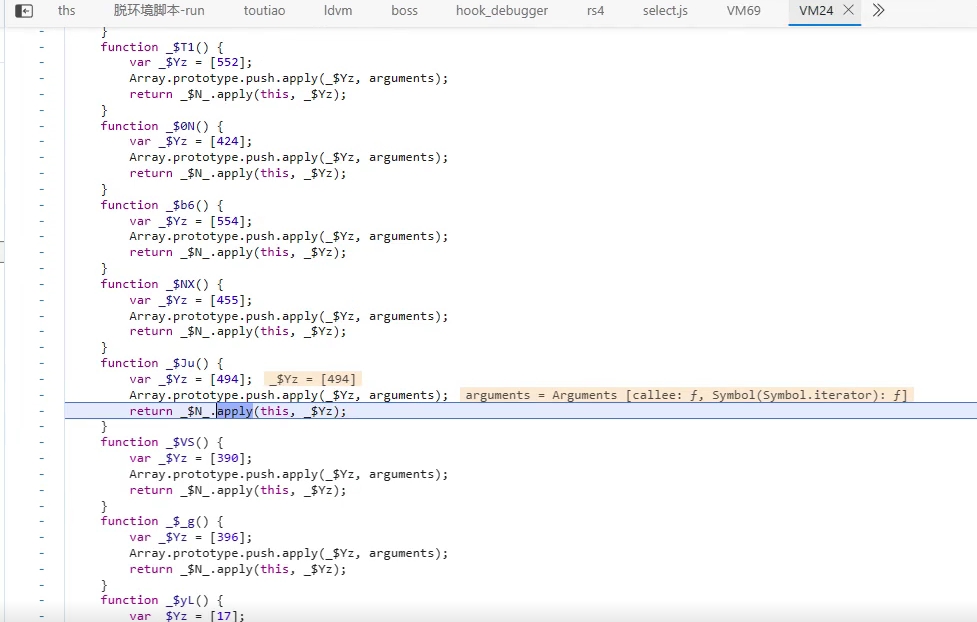
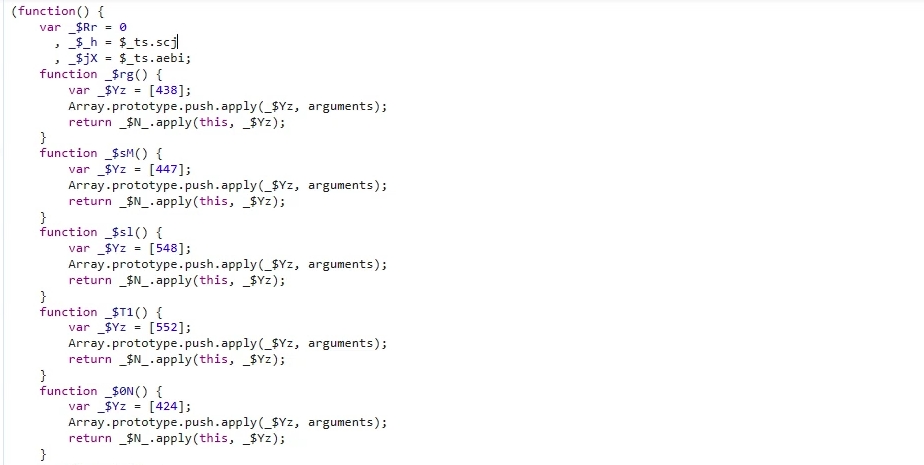
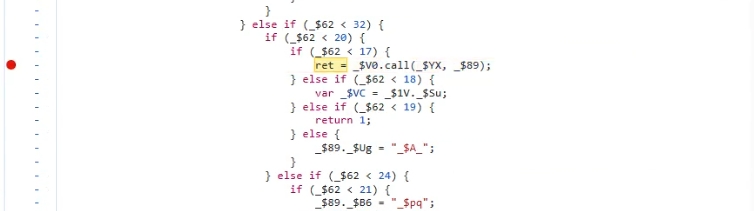
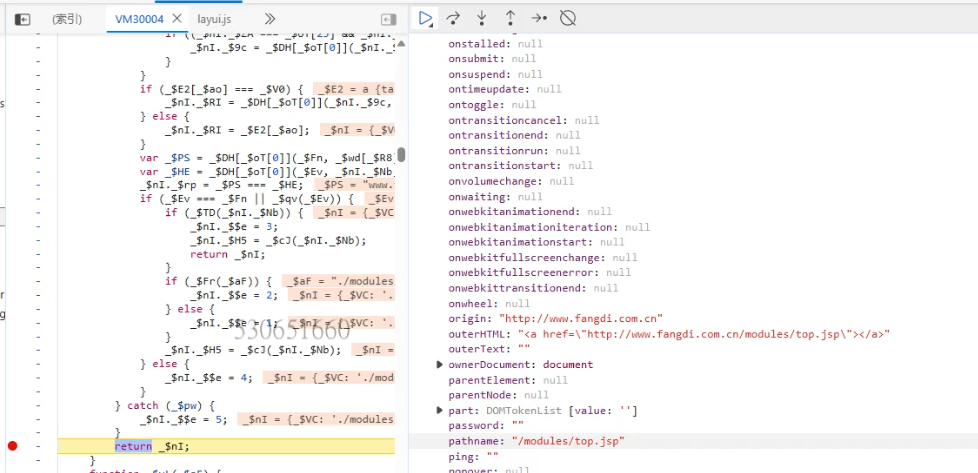
扣某数4代代码 点击检查,会进入一个断点,这个断点是不用去掉的,根据断点的函数堆栈往上找,可以找到一段vm代码
这里的几千行vm代码,都是通过eval()函数直接执行得到的,然后把执行返回的结果丢到vm里去
一般瑞数的代码,变量几乎都是$_这种方式命名的
vm代码的加载,是通过一个链接变量配合js的自执行函数来得到的
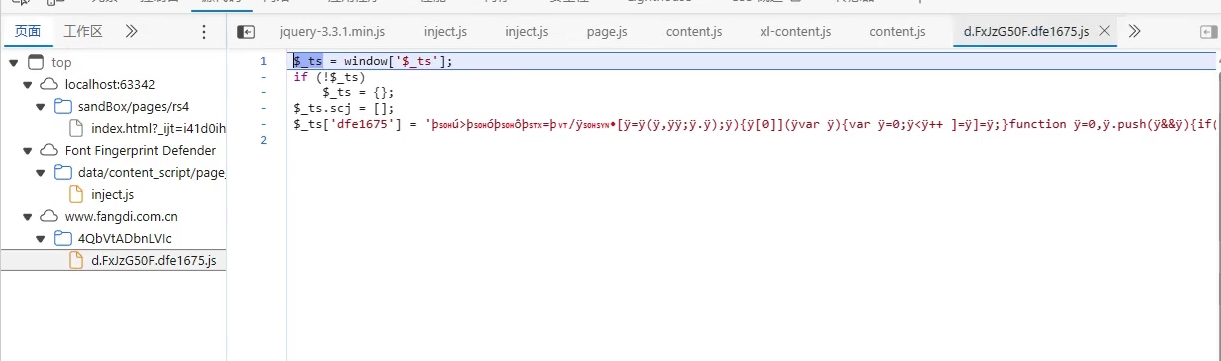
这里的$_ts就是链接,可以在全局下一个事件监听断点中的script脚本断点,在每一个js脚本执行之前断下来,这样可以找到所有加载的js脚本,从而定位到js的入口,当第一次断下来的时候,点击执行,会定位到很多js脚本
一直找到带有$_ts特征的js脚本
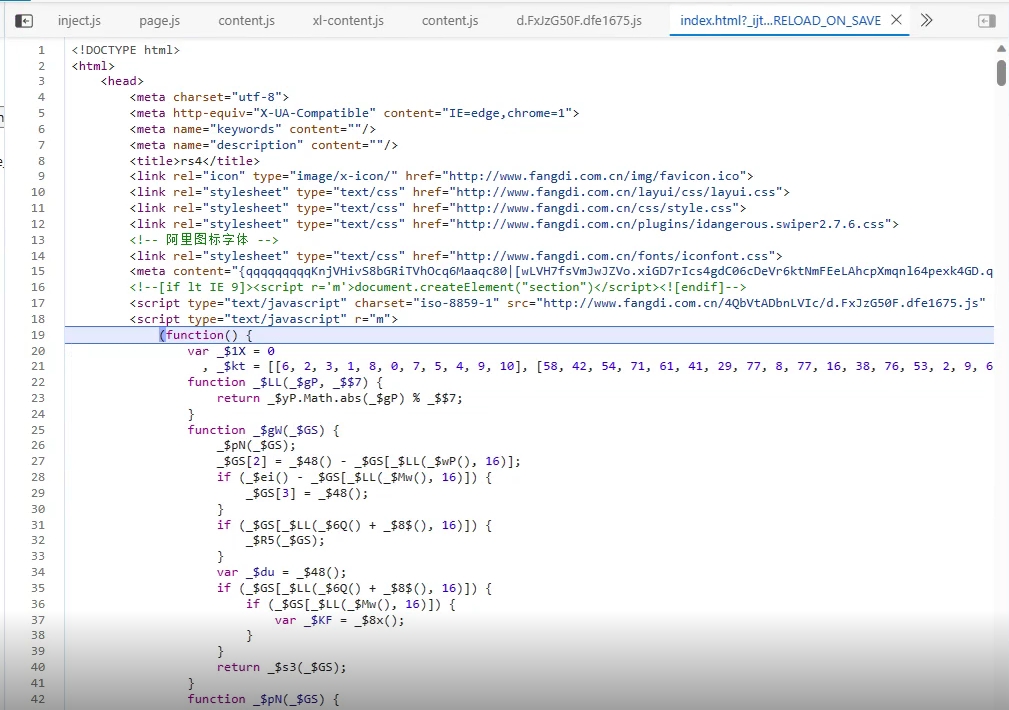
把这个js代码放到input.js里,然后继续运行,会跳转到index.html里的一段自执行函数里,把自执行函数也放到input.js里
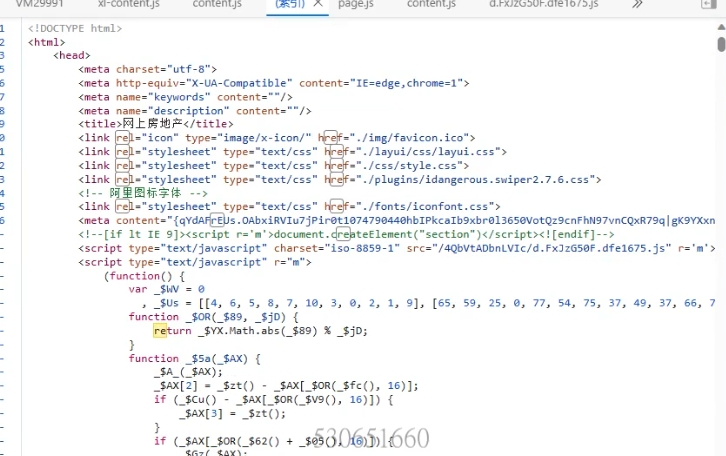
这里自执行函数的上面的src属性就是链接
1 <script type="text/javascript" charset="iso-8859-1" src="http://www.fangdi.com.cn/4QbVtADbnLVIc/d.FxJzG50F.dfe1675.js" r='m' ></script>
如果要处理编码的话,要用这里来的charset属性值的编码
自执行函数和上面的js脚本配合起来就生成了eval()代码,要补的就是这个input.js
补DOM环境 先跑起来,看日志,先把proxy打开,看访问了哪些属性,找到如下报错
1 {func|apply:[document.getElementsByTagName] -> type:[[object HTMLCollection]] ->args:[meta]}
因为我们没有创建meta标签,所以当调用这个方法的时候,获取不到返回值,需要在userVar.js里添加标签
浏览器创建meta标签,查看__proto__属性,看原型是什么,运行脱环境脚本把原型脱下来,这里原型是HTMLMetaElement
1 2 3 4 !function ( let a=document .createElement ('meta' ) }()
运行完之后又有新的报错
1 2 3 4 5 {obj|get :[Document _getElementsByTagName_meta] -> prop :[0 ] -> type :[[object HTMLMetaElement ]]} {obj|get :[Document _createElement_meta_1] -> prop :[Symbol (proto)] -> result :[undefined ]} {obj|get :[Document _createElement_meta_1] -> prop :[content] -> result :[getProtoAttribute->content未定义]} {obj|get :[Document _createElement_meta_1] -> prop :[Symbol (proto)] -> result :[undefined ]} {obj|get :[Document _createElement_meta_1] -> prop :[parentNode] -> result :[getProtoAttribute->parentNode未定义]}
报错是尝试获取meta标签的content属性,获取不到,就需要通过setProtoAttribute()去设置属性
content的值是什么呢?在首页的js里
1 <meta content="{qqqqqqqqqKnjVHivS8bGRiTVhOcq6Maaqc80|[wLVH7fsVmJwJZVo.xiGD7rIcs4gdC06cDeVr6ktNmFEeLAhcpXmqnl64pexk4GD.qFLNNOd4rIWIbSdlrQgIbktwxBWcgsjQEZek0uB1sQGHnunKHiEHycuQEw3BCqMvoIVmZqtHiz96GS6tmeqA6Gosoe7QTaoFs3329O1qH_eo9pDdmEfrPV6Zx_7GBO8HmtE_bu5zs33uNSjPo40r_rU_Wt0Z.koPpNy3Bpcdp5Tr_YP6r8V1Zsc3Hx7ST0F2KEqAGlIAAwx3GGU1ohTm0fiKmhLbvl6MrhLa2lc3ihekSGMiE3gO9licq.0M900hb5iuoBOwLP6l4096r0qqqqqqqqqlFSrlkKlVDdfe167qJ1701684316574hFGza5HAY3CNl3650qq!x7z,aac,amr,asm,avi,bak,bat,bmp,bin,c,cab,css,csv,com,cpp,dat,dll,doc,dot,docx,exe,eot,fla,flc,fon,fot,font,gdb,gif,gz,gho,hlp,hpp,htc,ico,ini,inf,ins,iso,js,jar,jpg,jpeg,json,java,lib,log,mid,mp4,mpa,m4a,mp3,mpg,mkv,mod,mov,mim,mpp,msi,mpeg,obj,ocx,ogg,olb,ole,otf,py,pyc,pas,pgm,ppm,pps,ppt,pdf,pptx,png,pic,pli,psd,qif,qtx,ra,rm,ram,rmvb,reg,res,rtf,rar,so,sbl,sfx,swa,swf,svg,sys,tar,taz,tif,tiff,torrent,txt,ttf,vsd,vss,vsw,vxd,woff,woff2,wmv,wma,wav,wps,xbm,xpm,xls,xlsx,xsl,xml,z,zip,apk,plist,ipaqqqqqqqiiFEH9qcMcNQt9A{UifVEhaZ2qofEQYe6svziQ2YnKPaqhqZ2YlmW1mTks9SEc9eKUTpCp2pHs0fwsTLRqrGkm0fh1TNsA2ZIKYJRKTZQssmgrvZrIaJeqoLrIam_rvaxwAN5qk162qr1qqqqqqqqqlmZlgm26649 0wR7HvJ6IsUC410DntKRngA;QyqA82EGtIB6ePNEeYo9NG;iEm6gdSTTpYiqU10OlvsnG;yMG8gk5okQ97gP4eb.IadA;T8F36FaS9AtR4sXBkRr0iG;RTlM3IYjAzboXbIiNSIFRA;t7_svh3Kc3.VU9jOjAJgdq;.8D9Zx78FrKF.Zn4xbfmIG;IMhCM7gXESIqShs5TNMo9A;pvBPF7OtrK6trS5vZYizwa;9qxqLXuEeDQeAlNfAL_l.A;VNeyFcNDtQZhV2sfCxyHqA;kT4JL2WRSOhvUIEcOjSrva;LpFhLGWYI8eFx_X999MLEq;NqssQaVItFB0TevtNxJrkG;AI3RN3R7lP0BBnYsoCO5KG;xrYRhwM6FYW7zCsPL.iecq;0kOXzZzt1eXLrlPo.QQ4xG;ApKNqLIRoybF5rIxSnabBG;hfgZrtz_KscdFC6a3f1wKA;Y53wfMWCgfXKRrRD8hGqNit1074790472r0Vl67PscJJxVVvs1rJxMqf" >
那么parentNode的报错怎么处理?
1 {obj|get:[Document_createElement_meta_1] -> prop:[parentNode] -> result:[getProtoAttribute->parentNode未定义]}
在浏览器中运行document.getElementByTagName("meta"),返回的是一个meta列表,找到对应的meta标签,然后输出这个标签的parentNode属性,发现就是head标签,创建head标签,把parentNode属性指过去
其他的DOM元素参照此种方法
1 2 3 4 5 6 7 8 !function ( let head = document .createElement ('head' ) let meta=document .createElement ('meta' ) sandBox.setProtoAttribute .call (meta,'content' ,'{qqqqq!x7z,aac,amr,asm,avi,bak,bat,bmp,bin,c,cab,css,csv,com,cpp,dat,dll,doc,dot,docx,exe,eot,fla,flc,fon,fot,font,gdb,gif,gz,gho,hlp,hpp,htc,ico,ini,inf,ins,iso,js,jar,jpg,jpeg,json,java,lib,log,mid,mp4,mpa,m4a,mp3,mpg,mkv,mod,mov,mim,mpp,msi,mpeg,obj,ocx,ogg,olb,ole,otf,py,pyc,pas,pgm,ppm,pps,ppt,pdf,pptx,png,pic,pli,psd,qif,qtx,ra,rm,ram,rmvb,reg,res,rtf,rar,so,sbl,sfx,swa,swf,svg,sys,tar,taz,tif,tiff,torrent,txt,ttf,vsd,vss,vsw,vxd,woff,woff2,wmv,wma,wav,wps,xbm,xpm,xls,xlsx,xsl,xml,z,zip,apk,plist,ipaqqqqqqqqqqqQExlYNrKGltA1NrFblFWYNfiXmFLU|[Ue3bgsCmH3f9LDPgkM9Byu_sRX0KPb1zWjAL.SB3HJVV0cXSMyrNzC1tMjmjvnOQtJ7qTpFthxaCnOFUhxZCuSBWk_q.7rHkcNyjGrtkRxZbbfUmmMWR1uNzJCVyFprAc0AsASA5hD3fWGzyqKlDFpwPcKGtRfwTKTQuA1xptUfpAqw7q22UY27zWUGCMnm3qvW71c2ZKC92YGSpcVaUoaWhx2gjU1QwVDeisGRiVpNUDlyllSAloPRxt9Gvr2rns2lDVTlrYaTiVSWrcbSsrAYoqb9asYz0lG7bxT3NhGfYwSreJuZThTVumqgJE27{W3DR1UmYYKG7WqrqEkaL1ccAWmqZqUYNmVV7ilS3FrSVVDfx3kpGFipqxlSN1AYplKPEAmGlpmiZJc80HpCYCVvm8ITxuKvAqqKt3vbVHzj9km6gN9fozlVaAr1qqr0k162l4096qhjUsrECFvJvEqqqqqqqqqqqqqqqq 0wR7HvJ6IsUC410DntKRngA;QyqA82EGtIB6ePNEeYo9NG;iEm6gdSTTpYiqU10OlvsnG;yMG8gk5okQ97gP4eb.IadA;T8F36FaS9AtR4sXBkRr0iG;RTlM3IYjAzboXbIiNSIFRA;t7_svh3Kc3.VU9jOjAJgdq;.8D9Zx78FrKF.Zn4xbfmIG;IMhCM7gXESIqShs5TNMo9A;pvBPF7OtrK6trS5vZYizwa;9qxqLXuEeDQeAlNfAL_l.A;VNeyFcNDtQZhV2sfCxyHqA;kT4JL2WRSOhvUIEcOjSrva;LpFhLGWYI8eFx_X999MLEq;NqssQaVItFB0TevtNxJrkG;AI3RN3R7lP0BBnYsoCO5KG;xrYRhwM6FYW7zCsPL.iecq;0kOXzZzt1eXLrlPo.QQ4xG;ApKNqLIRoybF5rIxSnabBG;hfgZrtz_KscdFC6a3f1wKA;qm26649Ddfe167lDXlTkHUVqlw7TRVE9VsQSzdm6AUIrRZlv01qr0l3650t1074790472hBz59hckrz4_Y_5oAAjnMlZF4gEHgvVyqXJ1699535420627\n' ) sandBox.setProtoAttribute .call (meta,'parentNode' ,head) let script = document .createElement ('script' ) sandBox.setProtoAttribute .call (script,'parentNode' ,head) }()
重新运行,发现报错信息
1 {Node_removeChild->[object HTMLMetaElement] 具体内容未实现}
这个函数是没有实现的,其实瑞数在执行这个函数的目的是在获取了meta的content属性和script标签的自执行函数之后,就会把这两个标签移除,但是这个函数不是监测点,其实不去补也行
继续看日志,里面有没有获取到的result是undefined的,发现location的navigator没有获取到
1 {obj|get:[location] -> prop:[navigator] -> result:[undefined]}
补的话也很容易
1 location.navigator = navigator
后面还有尝试获取location的一堆属性,没获取到
1
2
3
4
5
6
7
8
9
10
11
12
13
14
15
16
17
18
19
20
{obj|get:[location] -> prop:[navigator] -> result:[undefined]} {obj|get:[location] -> prop:[callPhantom] -> result:[undefined]} {obj|get:[location] -> prop:[_phantom] -> result:[undefined]} {obj|get:[location] -> prop:[$hook$] -> result:[undefined]} {obj|get:[location] -> prop:[$$logger] -> result:[undefined]} {obj|get:[location] -> prop:[$$lsp] -> result:[undefined]} {obj|get:[location] -> prop:[$$lsrb] -> result:[undefined]} {obj|get:[location] -> prop:[$hdx$] -> result:[undefined]} {obj|get:[location] -> prop:[$readyCodeAlreadyExecutedInThisFrame] -> result:[undefined]} {obj|get:[location] -> prop:[$sdx$] -> result:[undefined]} {obj|get:[location] -> prop:[$uie$] -> result:[undefined]} {obj|get:[location] -> prop:[netsparker] -> result:[undefined]} {obj|get:[location] -> prop:[__ns] -> result:[undefined]} {obj|get:[location] -> prop:[__nsAppendText] -> result:[undefined]} {obj|get:[location] -> prop:[eoWebBrowser] -> result:[undefined]} {obj|get:[location] -> prop:[hp_identifier] -> result:[undefined]} {obj|get:[location] -> prop:[appScanClick] -> result:[undefined]} {obj|get:[location] -> prop:[appScanFocusOut] -> result:[undefined]} {obj|get:[location] -> prop:[appScanKeyDown] -> result:[undefined]} {obj|get:[location] -> prop:[appScanKeyUp] -> result:[undefined]}
补的话,在浏览器中copy下location的实例,丢到userVar.js里就行了
1
2
3
4
5
6
7
8
9
10
11
12
location = { "ancestorOrigins" : {}, "href" : "chrome://new-tab-page/" , "origin" : "chrome://new-tab-page" , "protocol" : "chrome:" , "host" : "new-tab-page" , "hostname" : "new-tab-page" , "port" : "" , "pathname" : "/" , "search" : "" , "hash" : "" }
后面把proxy关掉,这样可以看函数缺失,就是哪些函数没有实现
1
2
3
4
5
6
7
{EventTarget_addEventListener | 异步事件:load} {Node_removeChild->[object HTMLMetaElement] 具体内容未实现} {EventTarget_addEventListener | 异步事件:unload} {Node_removeChild->[object HTMLScriptElement] 具体内容未实现} {tools|dispatch -> 环境缺失:Navigator_languages_get ->错误:Cannot read properties of undefined (reading 'apply') {tools|dispatch -> 环境缺失:Document_documentElement_get ->错误:Cannot read properties of undefined (reading 'apply') {tools|dispatch -> 环境缺失:Navigator_webkitPersistentStorage_get ->错误:Cannot read properties of undefined (reading 'apply')
先看Navigator_webkitPersistentStorage_get,浏览器运行navigator.webkitPersistentStorage
1
2
3
4
5
6
DeprecatedStorageQuota {} [[Prototype]]: DeprecatedStorageQuota queryUsageAndQuota: ƒ queryUsageAndQuota() requestQuota: ƒ requestQuota() Symbol(Symbol.toStringTag): "DeprecatedStorageQuota" [[Prototype]]: Object
浏览器执行getEnvCode(DeprecatedStorageQuota),发现报错了,因为这个类在浏览器中就不存在,所以直接模仿其他类的代码构造一个
然后运行Object.getOwnPropertyDescriptors(navigator.webkitPersistentStorage),浏览器直接返回空,所以在实现这个函数的时候直接返回空就行了
1 2 3 4 5 6 7 8 9 10 11 12 13 14 15 16 17 18 19 20 21 22 23 24 25 26 27 28 DeprecatedStorageQuota =function DeprecatedStorageQuota (} delete DeprecatedStorageQuota .prototype DeprecatedStorageQuota sandBox.safeProto (DeprecatedStorageQuota ,"DeprecatedStorageQuota" ) sandBox.defineProperty (DeprecatedStorageQuota .prototype "queryUsageAndQuota" ,{ configurable :false , enumerable : false , writable :false , value :function queryUsageAndQuota ( } }) sandBox.defineProperty (DeprecatedStorageQuota .prototype "requestQuota" ,{ configurable :false , enumerable : false , writable :false , value :function requestQuota ( } })
1 2 3 4 5 6 sandBox.envFuncs .Navigator_webkitPersistentStorage_get =function ( let _DeprecatedStorageQuota={} Object .setPrototypeOf (_DeprecatedStorageQuota,DeprecatedStorageQuota .prototype _DeprecatedStorageQuota=sandBox.proxy (_DeprecatedStorageQuota,'DeprecatedStorageQuota' ) return _DeprecatedStorageQuota; }
继续实现Document_documentElement_get,这个函数返回的是当前页面的document,但是在补的时候不需要返回这么复杂,意思一下就行
1 2 3 sandBox.envFuncs .Document_documentElement_get =function ( return '<html></html>' }
同样的方法补Navigator_languages_get
1 2 3 sandBox.envFuncs .Navigator_languages_get =function ( return ['zh-CN' , 'en' , 'en-GB' , 'en-US' ] }
然后把proxy打开,重新运行看日志
1 {tools|dispatch -> 环境缺失:window_setInterval ->错误:Cannot read properties of undefined (reading 'apply')
首先把对应的属性加到GlobalThis.js里,这个是window的模拟代码,因为window的属性太多了,需要哪个才往里面加哪个
1 2 3 sandBox.defineProperty (window ,"setInterval" ,{configurable :true ,enumerable :true ,writable :true ,value :function setInterval ( return sandBox.dispatch ("window_setInterval" ,this ,arguments ) }})
然后开始实现window_setInterval,同时实现window_clearInterval
toolFuncs.js里定义存储事件的列表和事件ID
1 2 sandBox.asyncCode .setInterval = [] sandBox.asyncCode .intervalID =-1
1 2 3 4 5 6 7 8 9 10 11 12 13 14 15 16 17 18 19 20 21 22 23 24 25 26 27 28 29 30 31 32 33 34 35 36 sandBox.envFuncs .window_setInterval =function ( sandBox.asyncCode .intervalID +=1 let func=arguments [0 ] let delay=arguments [1 ] let args=[] for (let i=2 ;i<arguments .length ;i++){ args.push (arguments [i]) } let type='func' if (typeof func==='function' ){ type='func' }else { type='func_str' } let event={ 'this' :this , 'type' :type, 'func' :func, 'delay' :delay, 'args' :args, 'intervalID' :sandBox.asyncCode .intervalID } sandBox.asyncCode .setInterval .push (event) sandBox.asyncCode .setInterval .sort (function (a,b ) { return a.delay -b.delay }) return sandBox.asyncCode .intervalID } sandBox.envFuncs .window_clearInterval =function (intervalID ){ for (let i=0 ;i<sandBox.asyncCode .setInterval .length ;i++){ let event=sandBox.asyncCode .setInterval [i] if (event['intervalID' ]===intervalID){ sandBox.asyncCode .setInterval .splice (i, 1 ); } } }
然后在asyncCode.js中实现取出事件、执行事件的代码逻辑
1
2
3
4
5
6
7
8
9
10
11
if (sandBox.asyncCode .setInterval !==[]){ let intervalFunc=sandBox.asyncCode .setInterval for (let i=0 ;i<intervalFunc.length ;i++){ let event=intervalFunc[i] if (event['type' ]==='func' ){ event['func' ].apply (event['this' ],event['args' ]) }else { eval (event['func' ]) } } }
补异步环境 1 {tools|dispatch -> 环境缺失:Navigator_getBattery ->错误:Cannot read properties of undefined (reading 'apply')
浏览器运行navigator.getBattery(),返回Promise对象,Promise一般是和.then搭配起来,达到异步执行代码的效果
1 2 3 4 5 6 7 8 9 10 11 12 13 14 15 16 17 navigator.getBattery ().then (function (battery ) { console .log (battery) }) BatteryManager {charging : true , chargingTime : 0 , dischargingTime : Infinity , level : 1 , onchargingchange : null , …} charging : true chargingTime : 0 dischargingTime : Infinity level : 1 onchargingchange : null onchargingtimechange : null ondischargingtimechange : null onlevelchange : null [[Prototype ]]: BatteryManager
首先解释一下这个navigator.getBattery()是干什么的,它的作用就是获取电池信息,并且它的回调函数的参数是BatteryManager对象,一定是这个对象,不会是别的
1 2 3 4 navigator.getBattery ().then (function (abc ) { console .log (abc); });
所以在模拟的时候,回调参数的参数一定要构造成BatteryManager对象,然后补的话和补setTimeout差不多思路,都是把Promise取出来,挨个去执行一遍
1 2 3 4 5 6 7 8 9 10 11 12 13 14 15 16 sandBox.envFuncs .Navigator_getBattery =function ( let batteryManager={} Object .setPrototypeOf (batteryManager,BatteryManager .prototype batteryManager=sandBox.proxy (batteryManager,'BatteryManager' ) let obj={ 'then' :function (callback ) { let _callback=callback; callback=function ( return _callback (batteryManager) } sandBox.asyncCode .Promises .push (callback) } } return obj }
toolFuncs.js里定义全局存放Promise对象的列表
1 sandBox.asyncCode.Promises=[]
这里简单解释一下怎么触发的这个逻辑?
当执行如下代码
1 2 3 navigator.getBattery ().then (function (battery ) { console .log (battery) })
调用的是上面的Navigator_getBattery,返回了obj对象,这个obj对象里定义了then属性,所以代码调用的navigator.getBattery().then实际上触发的是Navigator_getBattery里obj对象的then属性的属性值定义的函数,在这个函数里获取到了navigator.getBattery().then(...)传入的参数,也就是回调函数,把回调函数添加到全局列表中,等待依次执行
在asyncCode.js中依次执行Promise的异步回调函数
1
2
3
4
5
if (sandBox.asyncCode .Promises !==[]){ for (let i=0 ;i<sandBox.asyncCode .Promises .length ;i++){ sandBox.asyncCode .Promises [i]() } }
但是运行main.js的时候直接报错了
1 can't read properties of undefined(reading 'level')
获取不到level属性,结合BatteryManager.js里的属性,需要实现一下这个函数
1 2 3 sandBox.defineProperty (BatteryManager .prototype "level" ,{configurable :true ,enumerable :true ,get :function ( return sandBox.dispatch ("BatteryManager_level_get" ,this ,arguments ,undefined ) }
其他的方法也可以一并设置一下,返回值参照浏览器的属性值
1 2 3 4 5 6 7 8 9 10 11 12 sandBox.envFuncs .BatteryManager_level_get =function ( return 0.9 } sandBox.envFuncs .BatteryManager_charging_get =function ( return true } sandBox.envFuncs .BatteryManager_chargingTime_get =function ( return Infinity } sandBox.envFuncs .BatteryManager_dischargingTime_get =function ( return Infinity }
注意有个报错信息是获取navigator的battery属性,返回了undefined,这个不用管,因为浏览器执行navigator.battery返回的也是undefined,和浏览器保持一致就行了
补cookie生成环境 报错:未实现Document_createElement_form,在envFuncs.js里实现
1 2 3 4 5 6 7 8 9 10 11 12 13 14 15 16 17 18 19 20 sandBox.envFuncs .Document_createElement =function (tagName,options ) { let tag={}; switch (tagName) { case "div" : Object .setPrototypeOf (tag,HTMLDivElement .prototype tag=sandBox.proxy (tag,`Document_createElement_${tagName} _${sandBox.getID()} ` ) break ; case "form" : Object .setPrototypeOf (tag,HTMLFormElement .prototype tag=sandBox.proxy (tag,`Document_createElement_${tagName} _${sandBox.getID()} ` ) break ; default : console .log (`未实现Document_createElement_${tagName} ` ) break ; } sandBox.tags .push (tag) return tag; }
然后脱环境脚本把HTMLFormElement脱下来,丢到HTMLFormElement.js里
然后处理报错
1 {tools|dispatch -> 环境缺失:Element_getAttribute ->错误:Cannot read properties of undefined (reading 'apply')
getAttribute() 是一个 DOM 方法,用于获取 HTML 元素上的指定属性值(作为字符串),函数传入一个参数,然后把参数作为属性,尝试在当前DOM上访问该属性的属性值
比如
1
2
3
4
5
6
7
8
9
<div id="myDiv" class ="box" data-info="hello" ></div> const div = document .getElementById ("myDiv" );div.getAttribute ("class" ); div.getAttribute ("data-info" ); div.getAttribute ("id" ); div.getAttribute ("style" ); div.getAttribute ("Class" );
问题是,代码访问了哪些标签的哪些属性呢?首先要拿到属性,才能针对性的返回属性值,所以先写一个log输出,看访问了哪些属性
1 2 3 sandBox.envFuncs .Element_getAttribute =function (name ) { console .log (`{Element_getAttribute| get name ${name} }` ) }
然后运行看日志,发现访问了r属性,查看html源码,找到了这个标签
1 <script type="text/javascript" r="m" >
然后新增一个script标签,在script标签里添加上r属性,属性值是m
1
2
3
let script=document .createElement ('script' );sandBox.setProtoAttribute .call (script,'parentNode' ,head) sandBox.setProtoAttribute .call (script,'r' ,'m' )
后面就是在模拟的函数中返回属性值
1 2 3 4 sandBox.envFuncs .Element_getAttribute =function (name ) { console .log (`{Element_getAttribute| get name ${name} }` ) return sandBox.getProtoAttribute .call (this ,name) }
重新运行,报错
1 can't read properties of undefined(reading 'removeChild')
查看日志,看是在哪里发生的属性访问导致报错
1 {tools|dispatch -> 环境缺失:Node_parentElement_get ->错误:Cannot read properties of undefined (reading 'apply')
这个函数是获取当前节点的父节点,由于我们在userVar.js里已经设置过标签了,那么获取的节点的父节点大概率也是script标签和meta标签的父节点
1
2
3
4
5
6
7
let head=document .createElement ('head' );let meta=document .createElement ('meta' );sandBox.setProtoAttribute .call (meta,'content' ,'...' ) sandBox.setProtoAttribute .call (meta,'parentNode' ,head); let script=document .createElement ('script' );sandBox.setProtoAttribute .call (script,'parentNode' ,head); sandBox.setProtoAttribute .call (script,'r' ,'m' );
那么在实现函数的时候直接返回标签就可以了
1 2 3 sandBox.envFuncs .Node_parentElement_get =function ( return sandBox.getProtoAttribute .call (this ,'parentNode' ) }
然后重新运行,没有报错,说明此时DOM已经补的差不多了,剩下的就是globalThis的一些属性了,打开proxy,看里面有哪些日志返回的是undefined
这种是不用补的
1 {obj|get:[window] -> prop:[$_ts] -> result:[undefined]}
因为这是input.js里的
1 2 3 4 5 6 7 debugger ;$_ts = window ['$_ts' ]; if (!$_ts) $_ts = {}; $_ts.scj = []; $_ts['dfe1675' ] = '...'
要补的是这种
1 {obj|get:[window] -> prop:[execScript] -> result:[undefined]}
怎么补的,在浏览器打开目标网站,在控制台访问execScript,结果报错了,访问不到,说明也不用补
继续处理
1 {obj|get:[location] -> prop:[Symbol(Symbol.toStringTag)] -> result:[undefined]}
这个的原因是在userVar.js里的location赋值出了问题
1 2 3 4 5 6 7 8 9 10 11 12 13 location.navigator =navigator; location={ "ancestorOrigins" : {}, "href" : "http://localhost:63342/sandBox/pages/rs4/index.html?_ijt=i41d0ihh9alv4rd4olmj2co76i&_ij_reload=RELOAD_ON_SAVE" , "origin" : "http://localhost:63342" , "protocol" : "http:" , "host" : "localhost:63342" , "hostname" : "localhost" , "port" : "63342" , "pathname" : "/sandBox/pages/rs4/index.html" , "search" : "?_ijt=i41d0ihh9alv4rd4olmj2co76i&_ij_reload=RELOAD_ON_SAVE" , "hash" : "" }
因为在Location.js里设置过了location,并完成了原型链的模拟
而userVar.js在output.js的位置位于Location.js的下面,导致userVar.js把Location.js里设置的模拟代码给覆盖了
所以应该改成这样
1 2 3 4 5 6 7 8 9 10 location.ancestorOrigins ={}; location.href ="http://localhost:63342/sandBox/pages/rs4/index.html?_ijt=afksjb8r2vke54ojhq43mn6ogq&_ij_reload=RELOAD_ON_SAVE" ; location.origin ="http://localhost:63342" ; location.protocol ="http:" ; location.host ="localhost:63342" ; location.hostname ="localhost" ; location.port = "63342" ; location.pathname ="/sandBox/pages/rs4/index.html" ; location.search ="?_ijt=afksjb8r2vke54ojhq43mn6ogq&_ij_reload=RELOAD_ON_SAVE" location.hash =""
重新运行,直接报错了
1 can't read properties of undefined(reading 'userAgent')
关掉代理,重新运行,看日志,哪些方法没有实现
1 2 3 4 5 6 7 8 {tools|dispatch -> 环境缺失:location_href_set ->错误:Cannot read properties of undefined (reading 'apply') {tools|dispatch -> 环境缺失:location_protocol_set ->错误:Cannot read properties of undefined (reading 'apply') {tools|dispatch -> 环境缺失:location_host_set ->错误:Cannot read properties of undefined (reading 'apply') {tools|dispatch -> 环境缺失:location_hostname_set ->错误:Cannot read properties of undefined (reading 'apply') {tools|dispatch -> 环境缺失:location_port_set ->错误:Cannot read properties of undefined (reading 'apply') {tools|dispatch -> 环境缺失:location_pathname_set ->错误:Cannot read properties of undefined (reading 'apply') {tools|dispatch -> 环境缺失:location_search_set ->错误:Cannot read properties of undefined (reading 'apply') {tools|dispatch -> 环境缺失:location_hash_set ->错误:Cannot read properties of undefined (reading 'apply')
报错的原因是因为location对象在Location.js里被保护过了,有的属性直接用location.href='xxx'的方式设置不上去,需要在envFuncs.js里实现对应函数
1 2 3 4 5 6 7 8 9 10 11 12 13 14 15 16 17 18 19 20 21 22 23 24 25 26 27 28 29 30 31 32 33 34 35 36 37 38 39 40 41 42 43 44 45 46 47 48 49 50 51 !function ( sandBox.envFuncs .location_href_set =function (value ) { return sandBox.setProtoAttribute .call (this ,'href' ,value) } sandBox.envFuncs .location_href_get =function ( return sandBox.getProtoAttribute .call (this ,'href' ) } sandBox.envFuncs .location_protocol_set =function (value ) { return sandBox.setProtoAttribute .call (this ,'protocol' ,value) } sandBox.envFuncs .location_protocol_get =function ( return sandBox.getProtoAttribute .call (this ,'protocol' ) } sandBox.envFuncs .location_host_set =function (value ) { return sandBox.setProtoAttribute .call (this ,'host' ,value) } sandBox.envFuncs .location_host_get =function ( return sandBox.getProtoAttribute .call (this ,'host' ) } sandBox.envFuncs .location_hostname_set =function (value ) { return sandBox.setProtoAttribute .call (this ,'hostname' ,value) } sandBox.envFuncs .location_hostname_get =function ( return sandBox.getProtoAttribute .call (this ,'hostname' ) } sandBox.envFuncs .location_port_set =function (value ) { return sandBox.setProtoAttribute .call (this ,'port' ,value) } sandBox.envFuncs .location_port_get =function ( return sandBox.getProtoAttribute .call (this ,'port' ) } sandBox.envFuncs .location_pathname_set =function (value ) { return sandBox.setProtoAttribute .call (this ,'pathname' ,value) } sandBox.envFuncs .location_pathname_get =function ( return sandBox.getProtoAttribute .call (this ,'pathname' ) } sandBox.envFuncs .location_search_set =function (value ) { return sandBox.setProtoAttribute .call (this ,'search' ,value) } sandBox.envFuncs .location_search_get =function ( return sandBox.getProtoAttribute .call (this ,'search' ) } sandBox.envFuncs .location_hash_set =function (value ) { return sandBox.setProtoAttribute .call (this ,'hash' ,value) } sandBox.envFuncs .location_hash_get =function ( return sandBox.getProtoAttribute .call (this ,'hash' ) } }()
然后运行,正常不报错
继续看日志
1 {obj|get:[window] -> prop:[DOMParser] -> type:[undefined]}
浏览器执行DOMParser,是有返回的,所以需要补
然后把对应的属性给放到globalThis.js里
1 2 3 sandBox.defineProperty (window ,"DOMParser" ,{configurable :true ,enumerable :false ,writable :true ,value :function DOMParser ( return sandBox.dispatch ("window_DOMParser" ,this ,arguments ) }})
然后重新运行,日志里获取到返回值了
继续看日志
1 2 {obj|get :[window ] -> prop :[msCrypto] -> result :[undefined ]} {obj|has :[window ] -> prop :[ActiveXObject ] -> has :[undefined ]}
浏览器运行ActiveXObject和msCrypto都报错了,不用管
1 {obj|get:[window] -> prop:[name] -> result:[undefined]}
可以在globalThis里补一下,因为globalThis.js里给window模拟了name属性,在get属性值里return一个就行了
1 2 3 4 5 6 7 8 9 sandBox.defineProperty (window ,'name' ,{ configurable :true , enumerable :true , get :function ( return '' }, set :function ( } })
重新运行继续看日志
1 {obj|get :[window ] -> prop :[globalStorage] -> result :[undefined ]}
浏览器运行globalStorage,报错,所以不用补
继续看日志
1 {obj|get :[window ] -> prop :[indexedDB] -> type :[[undefined ]]}
浏览器运行indexedDB,返回的是IDBFactory
先把indexdDB属性添加到globalThis.js里
1 2 3 sandBox.defineProperty (window ,"indexedDB" ,{configurable :true ,enumerable :true ,get :function ( return sandBox.dispatch ("window_indexedDB_get" ,this ,arguments ) },set :undefined })
然后实现window_indexedDB_get方法,该方法返回一个IDBFactory对象
1 2 3 4 5 6 sandBox.envFuncs .window_indexedDB_get =function ( let db={}; Object .setPrototypeOf (db,IDBFactory .prototype db=sandBox.proxy (db,'IDBFactory' ) return db }
脱环境脚本把IDBFactory脱下来丢到IDBFactory.js里,重新运行,indexDB的获取不再报错
继续看日志
1 {obj|get:[navigator] -> prop:[standalone] -> result:[undefined]}
浏览器执行navigator.standalone,返回undefined,所以不要补
继续看日志
1 {obj|get:[navigator] -> prop:[chrome] -> result:[undefined]}
浏览器执行chrome,返回
1 2 3 4 5 6 7 {loadTimes: ƒ, csi: ƒ} app: (...) csi: ƒ () loadTimes: ƒ () get app: ƒ () set app: ƒ () [[Prototype]]: Object
在globalThis.js里添加对应属性
1 sandBox.defineProperty(window,"chrome",{configurable:false,enumerable:true,writable:true,value:{}})
不需要补其他的了,因为浏览器执行chrome.runtime和chrome.webstore都返回undefined
1 2 3 {obj|get:[window.chrome] -> prop:[runtime] -> result:[undefined]} {obj|get:[window] -> prop:[chrome] -> type:[[object Object]]} {obj|get:[window.chrome] -> prop:[webstore] -> result:[undefined]}
继续看日志
1 {obj|get:[window] -> prop:[webkitRequestFileSystem] -> type:[[undefined]]}
添加对应的属性到globalThis.js里
1 2 3 sandBox.defineProperty (window ,"webkitRequestFileSystem" ,{configurable :true ,enumerable :true ,writable :true ,value :function webkitRequestFileSystem ( return sandBox.dispatch ("window_webkitRequestFileSystem" ,this ,arguments ) }})
然后运行main.js,查看日志
1 {tools|dispatch -> 环境缺失:window_webkitRequestFileSystem ->错误:Cannot read properties of undefined (reading 'apply')
补该函数,不用添加返回值,因为浏览器执行webkitRequestFileSystem(1,2,{}),返回的就是undefined
1 2 3 sandBox.envFuncs .window_webkitRequestFileSystem =function ( }
继续看日志
1 {tools|dispatch -> 环境缺失:IDBFactory_open ->错误:Cannot read properties of undefined (reading 'apply')
浏览器执行下window.indexedDB.open("toDoList",4);,返回如下
1 2 3 4 5 6 7 8 9 10 11 IDBOpenDBRequest {onblocked: null, onupgradeneeded: null, source: null, transaction: null, readyState: 'pending', …} error: null onblocked: null onerror: null onsuccess: null onupgradeneeded: null readyState: "done" result: IDBDatabase {name: 'toDoList', version: 4, objectStoreNames: DOMStringList, onabort: null, onclose: null, …} source: null transaction: null [[Prototype]]: IDBOpenDBRequest
脱环境脚本把IDBOpenDBRequest和其原型链给脱下来,然后再补方法
1 2 3 4 5 6 7 8 9 10 11 12 13 14 15 16 17 18 19 20 21 22 23 24 25 26 27 28 29 30 31 32 33 sandBox.envFuncs .IDBFactory_open = function (name, options ) { let result = {} Object .setPrototypeOf (result, IDBDatabase .prototype sandBox.setProtoAttribute .call (result, 'name' , name.toString ()) sandBox.setProtoAttribute .call (result, 'version' , 1 ) sandBox.setProtoAttribute .call (result, 'onabort' , null ) sandBox.setProtoAttribute .call (result, 'onclose' , null ) sandBox.setProtoAttribute .call (result, 'onerror' , null ) sandBox.setProtoAttribute .call (result, 'onversionchange' , null ) let domList = {} Object .setPrototypeOf (domList, DOMStringList .prototype sandBox.setProtoAttribute .call (domList, 'length' , 0 ) domList = sandBox.proxy (domList, 'DOMStringList' ) sandBox.setProtoAttribute .call (result, 'objectStoreNames' , domList) result = sandBox.proxy (result, 'IDBDatabase' ) let idb = {} Object .setPrototypeOf (idb, IDBOpenDBRequest .prototype sandBox.setProtoAttribute .call (idb, 'result' , result) sandBox.setProtoAttribute .call (idb, 'readyState' , 'done' ) sandBox.setProtoAttribute .call (idb, 'error' , null ) sandBox.setProtoAttribute .call (idb, 'onblocked' , null ) sandBox.setProtoAttribute .call (idb, 'onerror' , null ) sandBox.setProtoAttribute .call (idb, 'onsuccess' , null ) sandBox.setProtoAttribute .call (idb, 'onupgradeneeded' , null ) sandBox.setProtoAttribute .call (idb, 'source' , null ) sandBox.setProtoAttribute .call (idb, 'transaction' , null ) idb = sandBox.proxy (idb, 'IDBOpenDBRequest' ) return idb }
再运行,会报一堆和上面IDBOpenDBRequest、DOMStringList有关的get、set方法,实现就行了
1 2 3 4 5 6 7 8 9 10 11 12 13 14 15 16 17 18 19 20 21 22 23 24 25 26 27 28 29 30 31 32 33 34 35 36 37 38 39 40 41 42 43 44 45 46 47 48 49 50 51 52 53 54 55 56 57 58 59 60 61 62 63 64 65 66 67 68 69 70 71 72 73 74 75 76 77 78 79 80 81 82 83 84 85 86 87 88 89 90 91 92 93 94 95 96 sandBox.envFuncs .IDBDatabase_name_set = function (value ) { return sandBox.setProtoAttribute .call (this , 'name' , value) } sandBox.envFuncs .IDBDatabase_name_get = function ( return sandBox.getProtoAttribute .call (this , 'name' ) } sandBox.envFuncs .IDBDatabase_objectStoreNames_set = function (value ) { return sandBox.setProtoAttribute .call (this , 'objectStoreNames' , value) } sandBox.envFuncs .IDBDatabase_objectStoreNames_get = function ( return sandBox.getProtoAttribute .call (this , 'objectStoreNames' ) } sandBox.envFuncs .IDBDatabase_onabort_set = function (value ) { return sandBox.setProtoAttribute .call (this , 'onabort' , value) } sandBox.envFuncs .IDBDatabase_onabort_get = function ( return sandBox.getProtoAttribute .call (this , 'onabort' ) } sandBox.envFuncs .IDBDatabase_onclose_set = function (value ) { return sandBox.setProtoAttribute .call (this , 'onclose' , value) } sandBox.envFuncs .IDBDatabase_onclose_get = function ( return sandBox.getProtoAttribute .call (this , 'onclose' ) } sandBox.envFuncs .IDBDatabase_onerror_set = function (value ) { return sandBox.setProtoAttribute .call (this , 'onerror' , value) } sandBox.envFuncs .IDBDatabase_onerror_get = function ( return sandBox.getProtoAttribute .call (this , 'onerror' ) } sandBox.envFuncs .IDBDatabase_onversionchange_set = function (value ) { return sandBox.setProtoAttribute .call (this , 'onversionchange' , value) } sandBox.envFuncs .IDBDatabase_onversionchange_get = function ( return sandBox.getProtoAttribute .call (this , 'onversionchange' ) } sandBox.envFuncs .IDBDatabase_version_set = function (value ) { return sandBox.setProtoAttribute .call (this , 'version' , value) } sandBox.envFuncs .IDBDatabase_version_get = function ( return sandBox.getProtoAttribute .call (this , 'version' ) } sandBox.envFuncs .IDBRequest_error_set = function (value ) { return sandBox.setProtoAttribute .call (this , 'error' , value) } sandBox.envFuncs .IDBRequest_error_get = function ( return sandBox.getProtoAttribute .call (this , 'error' ) } sandBox.envFuncs .IDBOpenDBRequest_onblocked_set = function (value ) { return sandBox.setProtoAttribute .call (this , 'onblocked' , value) } sandBox.envFuncs .IDBOpenDBRequest_onblocked_get = function ( return sandBox.getProtoAttribute .call (this , 'onblocked' ) } sandBox.envFuncs .IDBRequest_readyState_set = function (value ) { return sandBox.setProtoAttribute .call (this , 'readyState' , value) } sandBox.envFuncs .IDBRequest_readyState_get = function ( return sandBox.getProtoAttribute .call (this , 'readyState' ) } sandBox.envFuncs .IDBRequest_result_set = function (value ) { return sandBox.setProtoAttribute .call (this , 'result' , value) } sandBox.envFuncs .IDBRequest_result_get = function ( return sandBox.getProtoAttribute .call (this , 'result' ) } sandBox.envFuncs .IDBRequest_source_set = function (value ) { return sandBox.setProtoAttribute .call (this , 'source' , value) } sandBox.envFuncs .IDBRequest_source_get = function ( return sandBox.getProtoAttribute .call (this , 'source' ) } sandBox.envFuncs .IDBRequest_transaction_set = function (value ) { return sandBox.setProtoAttribute .call (this , 'transaction' , value) } sandBox.envFuncs .IDBRequest_transaction_get = function ( return sandBox.getProtoAttribute .call (this , 'transaction' ) } sandBox.envFuncs .IDBRequest_onsuccess_set = function (value ) { return sandBox.setProtoAttribute .call (this , 'onsuccess' , value) } sandBox.envFuncs .IDBRequest_onsuccess_get = function ( return sandBox.getProtoAttribute .call (this , 'onsuccess' ) } sandBox.envFuncs .IDBRequest_onerror_set = function (value ) { return sandBox.setProtoAttribute .call (this , 'onerror' , value) } sandBox.envFuncs .IDBRequest_onerror_get = function ( return sandBox.getProtoAttribute .call (this , 'onerror' ) } sandBox.envFuncs .IDBOpenDBRequest_onupgradeneeded_set = function (value ) { return sandBox.setProtoAttribute .call (this , 'onupgradeneeded' , value) } sandBox.envFuncs .IDBOpenDBRequest_onupgradeneeded_get = function ( return sandBox.getProtoAttribute .call (this , 'onupgradeneeded' ) }
继续看日志
1 {obj|get:[window] -> prop:[fetch] -> type:[undefined]}
把对应属性添加到globalThis.js里
1 2 3 sandBox.defineProperty (window ,"fetch" ,{configurable :true ,enumerable :true ,writable :true ,value :function fetch ( return sandBox.dispatch ("window_fetch" ,this ,arguments ) }})
后面基本上依葫芦画瓢了,造轮子就行
如果要打印cookie,在output.js里或者在asyncCode.js里加上
1 console .log ('cookie:' ,sandBox.cookieJar )
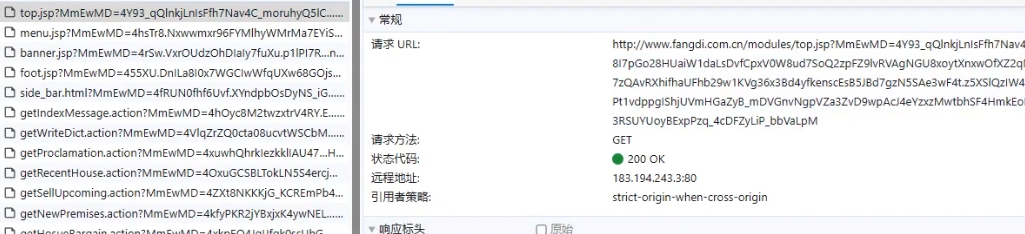
get参数生成 浏览器访问一下页面,可以看到所有的访问都携带了一个get请求的参数
请求的发送是通过XMLHttpRequest,推测是在这个对象上做了修改,这样每次用这个对象发送请求的时候都可以携带参数
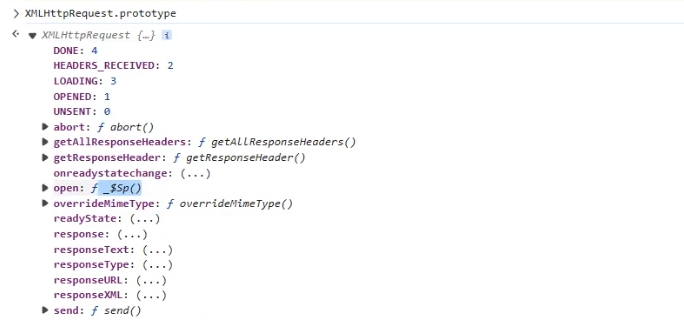
浏览器执行XMLHttpRequest.prototype,发现里面的open属性被重写了
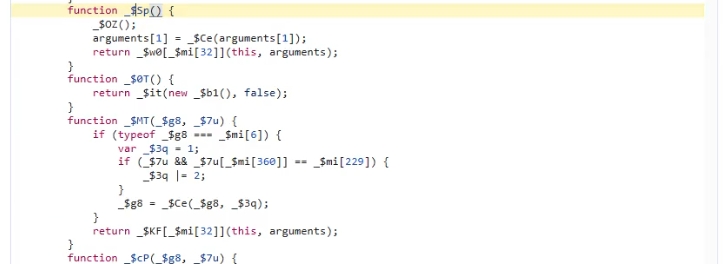
点开这个属性,可以进到源代码里
推测就是在这个函数里对参数进行加密的
注意这个时候不能在这里打断点,因为这是VM的代码,VM123.js 不是服务端返回的固定 JS 文件,而是通过 eval() 或 URL.createObjectURL(new Blob(...)) 等方式动态生成的临时脚本文件,每次页面加载都会变,对 VM1234 打的断点,在下一次刷新后可能变成了 VM6578,原来的断点失效了。
首先要断在这个代码里,怎么做呢?还是打上脚本加载的全局断点,直到跟到index那里
搜索ret = ,这是瑞数的特征字符串
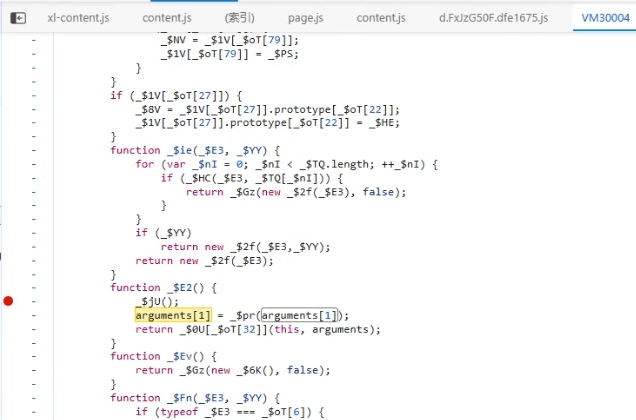
在这里断下来,然后步入,就找到了动态生成的VM的代码,搜索字符串arguments[1],因为这是上面函数的字符串,再怎么混淆,这个是不变的,最终定位到这里
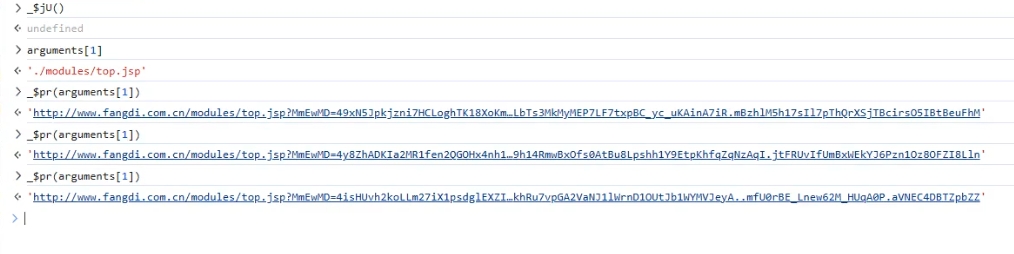
在这里打上断点,发现执行_$ju()的时候返回undefined,说明这个函数不重要,执行后面的arguments[1]和_$pr(arguments[1]),每次执行_$pr(arguments[1])的时候返回结果都不一样,所以关键函数就是这里的_$pr()函数
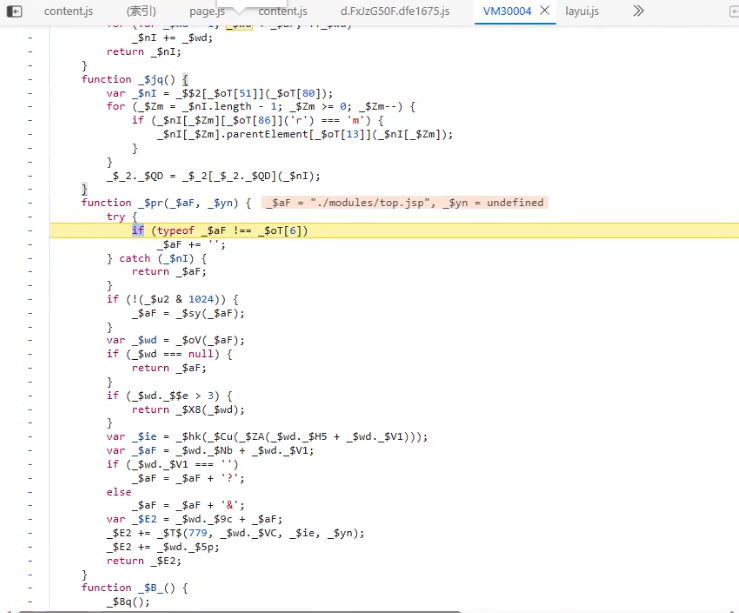
步入这个函数
后面要做的就是模拟这个函数,函数做了什么,我们在代码中就要模拟对应的行为,比如在跟代码的时候发现代码中对a标签设置了href属性,由于前面我们已经在asyncCode.js中创建了a标签,所以这里就实现设置href属性的方法就行了
快捷的方式是在代码里直接看变量的属性,哪些属性被设置成什么值了很清楚,在初始化a标签的时候设置上去就可以了
1 2 3 4 5 6 7 8 9 10 11 12 13 14 15 16 case "a" : Object .setPrototypeOf (tag,HTMLAnchorElement .prototype tag.namespaceURI ='http://www.w3.org/1999/xhtml' tag.accessKey ='' location.protocol ?tag.protocol =location.protocol :tag.protocol ='http:' location.host ?tag.baseURI =location.protocol +"//" +location.host :tag.baseURI ='http://xjb' location.host ?tag.host =location.host :tag.host ="" location.hostname ?tag.hostname =location.hostname :location.hostname ="" location.port ?tag.port =location.port :tag.port ="" location.origin ?tag.origin =location.origin :tag.origin ="" location.search ?tag.search =location.search :tag.search ="" location.pathname ?tag.pathname =location.pathname :tag.pathname ="" location.hash ?tag.hash =location.hash :tag.hash ="" tag=sandBox.proxy (tag,`Document_createElement_${tagName} _${sandBox.getID()} ` ) break ;
1 2 3 4 5 6 7 8 9 10 11 12 13 14 15 16 17 18 19 20 21 22 23 24 25 26 27 28 29 30 31 32 33 34 35 36 37 38 39 40 41 42 43 44 45 46 47 48 49 50 51 52 53 54 55 56 57 58 59 60 61 62 63 64 65 66 67 68 sandBox.envFuncs .HTMLAnchorElement_href_set =function (value ) { if (location.protocol &&location.host ){ if (value.startsWith ("./" )){ value = value.substring (1 ); let new_value=location.protocol +'//' +location.host +value sandBox.setProtoAttribute .call (this ,'pathname' ,value) return sandBox.setProtoAttribute .call (this ,'href' ,new_value) } } return sandBox.setProtoAttribute .call (this ,'href' ,value) } sandBox.envFuncs .HTMLAnchorElement_href_get =function ( return sandBox.getProtoAttribute .call (this ,'href' ) } sandBox.envFuncs .HTMLAnchorElement_protocol_set =function (value ) { return sandBox.setProtoAttribute .call (this ,'protocol' ,value) } sandBox.envFuncs .HTMLAnchorElement_protocol_get =function ( return sandBox.getProtoAttribute .call (this ,'protocol' ) } sandBox.envFuncs .HTMLAnchorElement_host_set =function (value ) { return sandBox.setProtoAttribute .call (this ,'host' ,value) } sandBox.envFuncs .HTMLAnchorElement_host_get =function ( return sandBox.getProtoAttribute .call (this ,'host' ) } sandBox.envFuncs .HTMLAnchorElement_hostname_set =function (value ) { return sandBox.setProtoAttribute .call (this ,'hostname' ,value) } sandBox.envFuncs .HTMLAnchorElement_hostname_get =function ( return sandBox.getProtoAttribute .call (this ,'hostname' ) } sandBox.envFuncs .HTMLAnchorElement_port_set =function (value ) { return sandBox.setProtoAttribute .call (this ,'port' ,value) } sandBox.envFuncs .HTMLAnchorElement_port_get =function ( return sandBox.getProtoAttribute .call (this ,'port' ) } sandBox.envFuncs .HTMLAnchorElement_origin_set =function (value ) { return sandBox.setProtoAttribute .call (this ,'origin' ,value) } sandBox.envFuncs .HTMLAnchorElement_origin_get =function ( return sandBox.getProtoAttribute .call (this ,'origin' ) } sandBox.envFuncs .HTMLAnchorElement_search_set =function (value ) { return sandBox.setProtoAttribute .call (this ,'search' ,value) } sandBox.envFuncs .HTMLAnchorElement_search_get =function ( return sandBox.getProtoAttribute .call (this ,'search' ) } sandBox.envFuncs .HTMLAnchorElement_hash_set =function (value ) { return sandBox.setProtoAttribute .call (this ,'hash' ,value) } sandBox.envFuncs .HTMLAnchorElement_hash_get =function ( return sandBox.getProtoAttribute .call (this ,'hash' ) } sandBox.envFuncs .HTMLAnchorElement_hostname_set =function (value ) { return sandBox.setProtoAttribute .call (this ,'hostname' ,value) } sandBox.envFuncs .HTMLAnchorElement_hostname_get =function ( return sandBox.getProtoAttribute .call (this ,'hostname' ) } sandBox.envFuncs .HTMLAnchorElement_pathname_set =function (value ) { return sandBox.setProtoAttribute .call (this ,'pathname' ,value) } sandBox.envFuncs .HTMLAnchorElement_pathname_get =function ( return sandBox.getProtoAttribute .call (this ,'pathname' ) }
在asyncCode.js中添加xmlHTTP请求,参数在浏览器中打断点可以看到
1
2
let xml=new XMLHttpRequest ();console .log (xml.open ('GET' ,'./modules/top.jsp' ))
然后在日志中可以看到成功发起请求
这里不用再扣代码,因为加密逻辑都在input.js里,我们要做的就是把需要的标签给补齐